Modern infrastructure (whether cloud-based, on-prem, or hybrid) is dynamic. Configuration changes happen constantly: developers update services, engineers tweak network rules, or automated scripts adjust system settings. While these changes are often intentional, they might introduce configuration drift - a divergence between the desired state defined in your code or policy and the actual state of your infrastructure.
For security engineers, configuration drift is not just an operational concern — it’s a critical security risk. Config drifts may lead to:
Unintended open ports or FW rules exposing sensitive resources.
Misconfigured IAM roles or permissions, allowing privilege escalation.
Non-compliant infrastructure violating internal or regulatory policies.
Vulnerable software versions running undetected on production systems.
Manual detection of drift across multiple environments is time-consuming and error-prone. Automated auditing scripts and CI/CD integrations are essential to detect, report, and remediate drift quickly, maintaining security, compliance, and operational consistency.
In this post, I’ll explore:
What config drift is and why it matters for security.
How to automate detection of drift using open-source and cloud-native tools.
Practical examples of drift detection scripts in Python & CLI.
Strategies to remediate drift and integrate checks into CI/CD pipelines.
Best practices to prevent drift proactively.
By reading this post till the end, you can have a structured approach to “drift no more”, ensuring infrastructure stays aligned with policy and security expectations.
What Is Configuration Drift?
Configuration drift happens when the real setup of your systems slowly changes from what you originally planned or approved. Even small changes—an extra security group rule, a new IAM permission, a disabled logging setting—can push your environment away from its secure baseline.
Drift usually appears because of:
Manual changes made directly in the console or on servers
Temporary fixes that never get reverted
Untracked updates from other teams or automated tools
Inconsistent IaC deployments across environments
When drift builds up, you lose control and visibility. Systems that were once secure can become exposed, misconfigured, or non-compliant without anyone noticing.
This is why drift is a real security risk: attackers often exploit misconfigurations that teams did not know existed. Detecting and fixing drift early keeps your environment aligned with the security rules you intended.
Why Drift Detection Matters for Security Engineers
Configuration drift is not only an operational problem. It is also a security risk. When systems slowly change from their approved state, they can become easier to attack.
Key Risks
Unexpected open ports or services
A server may start running something that was not part of the plan. Attackers may use it.
Changed permissions
Users or processes may get more access than they should, creating privilege-escalation paths.
Disabled security controls
Logging, firewall rules, or monitoring agents may be turned off without anyone noticing.
Unpatched or inconsistent versions
Some machines may miss updates. Attackers look for these weak points.
Harder investigations
If every machine is different, it becomes harder to understand alerts or reproduce incidents.
Drift detection helps keep systems predictable, hardened, and safe.
Automated Auditing: Key Concepts
Automated auditing is the process of continuously checking systems, configurations, and infrastructure against a known-good baseline. The goal is to detect drift early, reduce manual work, and keep environments consistent and secure.
Core concepts
Baseline Definition
A baseline is the approved configuration. It can be a Terraform state file, an Ansible playbook, a Kubernetes manifest, or a simple JSON/YAML policy file.
State Collection
The auditing tool collects the actual state from systems.
Examples:
Querying cloud APIs (AWS, Azure, GCP)
Running OS commands or agents on servers
Reading configuration files
Pulling container or Kubernetes specs
State Comparison
The collected state is compared with the baseline.
Differences indicate drift.
Policy Enforcement
Some auditing systems use policies (like OPA or AWS Config Rules) to define what is allowed and what is not.
Continuous Monitoring
Automated audits run on a schedule (every X minutes/hours) or event-driven (e.g., on deployment).
Alerting and Reporting
When drift is found, the system sends alerts through Slack, email, SIEM, or ticketing systems.
Automated or Manual Remediation
Once drift is detected, tools may auto-fix the resources or open a ticket for manual review.
Automated auditing creates a feedback loop that keeps infrastructure consistent, compliant, and secure.
Choosing the Right Tools
Selecting the right tools is crucial for effective drift detection and automated auditing. Tools should help you compare the current state of your infrastructure or configurations against the desired state, provide clear reporting, and ideally allow for remediation.
Open-Source Options
Several open-source tools are widely used in the security and DevOps community:
Terraform + terraform plan
Detects differences between deployed infrastructure and Terraform configuration.
Can be integrated into CI/CD pipelines for automated checks.
Example:
terraform init
terraform plan -out=plan.out
terraform show -json plan.out
InSpec (by Chef)
Allows writing tests for infrastructure configurations in a human-readable way.
AWS CloudTrail + CloudWatch
Tracks API activity and changes across AWS services.
Enables alerting when configuration drift occurs.
AWS Systems Manager Compliance
Checks managed instances against a desired state defined by State Manager documents.
Using the right combination of open-source and cloud-native tools ensures you can detect drift across both on-prem and cloud environments, providing full coverage for security engineers.
Writing Effective Drift Detection Scripts
Automated scripts allow security engineers to continuously monitor infrastructure and configuration drift without manual intervention. The goal is to detect deviations from the desired state and optionally trigger remediation or alerts.
Key principles for effective scripts:
Idempotency: Running the script multiple times should produce consistent results.
Readability: Scripts should be clear, with comments explaining why checks are performed.
Logging & Reporting: Every drift detected should be logged with context (resource, expected vs actual state).
Integration: Scripts should be callable from CI/CD pipelines or scheduled jobs for automated execution.
Extensibility: Easily add new checks as the environment grows.
Python Example for Infrastructure Drift
Python is popular for writing drift detection scripts due to its rich ecosystem and cloud SDKs.
## drift_check.py
importboto3## Initialize AWS S3 client
s3=boto3.client('s3')## Desired state: All buckets must have server-side encryption enabled
desired_state=True## Fetch all S3 buckets
buckets=s3.list_buckets()['Buckets']forbucketinbuckets:bucket_name=bucket['Name']try:enc=s3.get_bucket_encryption(Bucket=bucket_name)status=Trueexcepts3.exceptions.ClientError:status=Falseifstatus!=desired_state:print(f"DRIFT DETECTED: Bucket '{bucket_name}' encryption is not enabled!")
Explanation:
This script checks all S3 buckets to see if server-side encryption is enabled.
Drift is flagged when a bucket does not meet the desired configuration.
Comments and clear print statements make it easy to understand and act on findings.
Can be extended to check IAM policies, security groups, or other AWS resources.
Shell/CLI Automation Example
For quick audits or integration into CI/CD, shell scripts can be useful:
#!/bin/bash## Desired: All Docker containers running specific versionDESIRED_IMAGE="nginx:1.25"for container in$(docker ps --format'');do
image=$(docker inspect --format=''$container)if["$image"!="$DESIRED_IMAGE"];then
echo"DRIFT DETECTED:"echo"Container $container"echo"running $image instead of $DESIRED_IMAGE"echo"---"fi
done
Explanation:
This script iterates over running Docker containers.
Flags any container that deviates from the desired image version.
Useful in local or CI/CD test environments to ensure consistency and immutability of deployments.
By creating Python or shell scripts with clear logic and logging, security engineers can detect drift early, before it becomes a vulnerability or compliance issue.
Remediation Strategies
Once drift is detected, the next step is bringing your infrastructure back to the desired state. Key strategies include:
Automated Remediation: Use scripts or IaC tools (Terraform, CloudFormation, Ansible) to automatically fix drift.
Manual Review: For sensitive changes, alert engineers to review and approve corrections.
Policy Enforcement: Implement guardrails that prevent unauthorized changes, e.g., AWS Config rules or GitOps practices.
Rollback & Restore: Keep snapshots or backups to quickly revert unintended changes.
Tip: Always log detected drift and applied fixes. This provides auditability and helps identify recurring issues.
Integration with CI/CD Pipelines
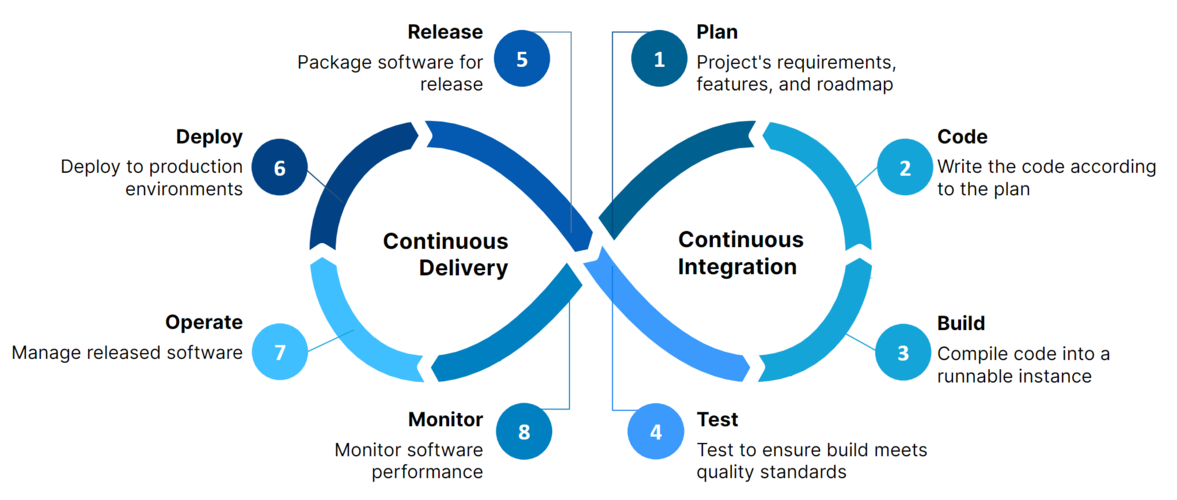
Integrating drift detection into your CI/CD pipelines ensures that infrastructure stays consistent automatically. Key points:
Pre-Deployment Checks: Run drift detection scripts before applying new changes to catch unexpected differences early.
Post-Deployment Validation: Verify that the deployed infrastructure matches the desired state after every pipeline run.
Fail Fast: Configure pipelines to fail if critical drift is detected, preventing unsafe deployments.
Automation Hooks: Use CI/CD stages or jobs to trigger drift checks, e.g., GitHub Actions, GitLab CI, or Jenkins pipelines.
Notifications: Send alerts or Slack messages when drift is detected during CI/CD runs.
Example: A GitHub Actions job can run a Terraform plan and compare it to the applied state to detect drift before merging changes.
Monitoring, Alerts, and Reporting
Effective drift detection isn’t just about running scripts—it’s about knowing when something goes wrong and taking action quickly.
Key points:
Continuous Monitoring: Schedule regular checks to detect drift as soon as it occurs. Use cron jobs, CI/CD schedules, or cloud-native monitoring tools.
Alerting: Integrate notifications to Slack, email, or other channels when drift is detected. Immediate alerts help teams respond faster.
Centralized Reporting: Collect and store drift detection results in dashboards or logs for visibility
Best Practices for Drift Prevention
Preventing drift is always easier than fixing it. Security engineers should follow these key practices:
Infrastructure as Code (IaC): Define all infrastructure declaratively (Terraform, CloudFormation, Pulumi) so the desired state is version-controlled.
Immutable Infrastructure: Avoid making manual changes to live systems; redeploy rather than patch in place.
Access Controls: Limit who can make changes to infrastructure and enforce approval workflows.
Regular Audits: Schedule automated drift detection and review logs for any unauthorized changes.
Version Pinning: Lock dependencies, Docker images, and modules to specific versions to reduce unexpected changes.
CI/CD Enforcement: Integrate drift detection into deployment pipelines to ensure only intended changes are applied.
Documentation: Maintain clear, up-to-date documentation of infrastructure standards and policies.
Following these practices helps minimize surprises, maintain security posture, and reduce operational risks.
Conclusion
Configuration drift is a hidden risk that can silently undermine security and stability. By implementing automated drift detection, integrating checks into CI/CD pipelines, and following best practices for prevention, security engineers can:
Ensure infrastructure matches the desired state.
Detect unauthorized or accidental changes early.
Reduce operational and security risks.
Maintain compliance and audit readiness.
“Drift No More” is not just a goal—it’s a continuous practice that keeps your infrastructure secure, consistent, and reliable.
Learn Terraform from scratch with this beginner-friendly guide. Step through setup, key concepts, and practical examples—plus grab the ultimate command...
A focused guide on securing Terraform infrastructure-as-code, covering state file protection, least privilege, secrets management, and guardrail automation
Drift detection is not optional—it’s a cornerstone of modern security engineering.
— Dan.C