CI/CD (Continuous Integration / Continuous Deployment) pipelines are the backbone of modern software delivery. They allow teams to build, test, and deploy code automatically, increasing efficiency and reducing errors.
However, pipelines are also high-value attack vectors. If compromised, attackers can:
Inject malicious code into production.
Exfiltrate secrets such as cloud credentials.
Gain unauthorized access to servers or services.
This guide provides practical, step-by-step instructions for security engineers to secure CI/CD pipelines using GitHub Actions and GitLab CI/CD, from general best practices to platform-specific hardening.
What is CI/CD?
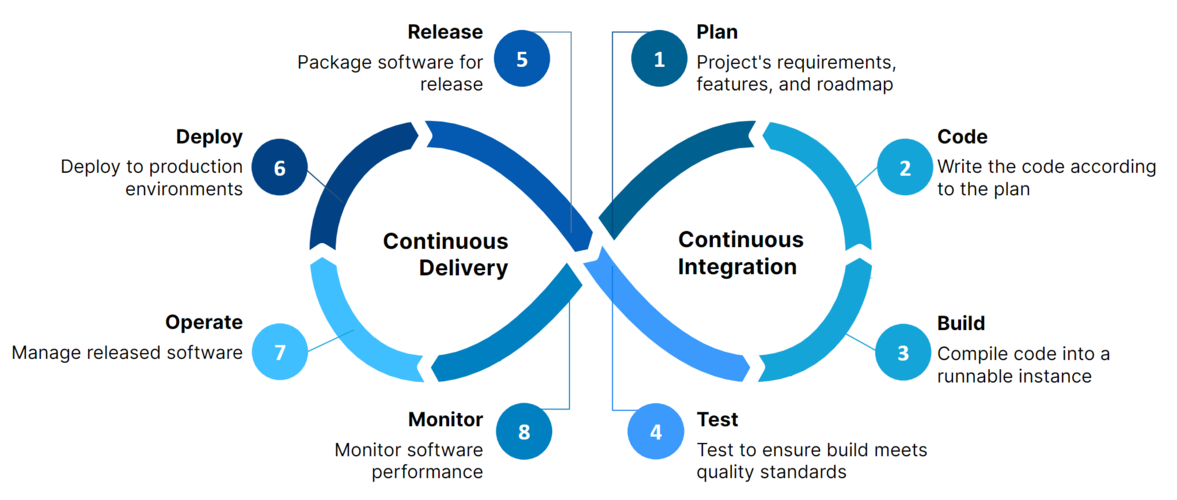
CI/CD is a set of practices that automate software delivery:
Continuous Integration (CI): Developers frequently merge code changes into a central repository. Automated builds and tests validate these changes early, reducing integration issues.
Continuous Deployment / Delivery (CD): Changes that pass CI are automatically deployed to staging or production environments, eliminating repetitive manual steps.
Benefits:
Faster and more reliable releases.
Reduced human error during deployment.
Continuous feedback through automated testing.
Risks if misconfigured:
Leaked secrets.
Compromised runners executing untrusted code.
Supply chain attacks via third-party actions or dependencies.
CI/CD Platforms Overview
Before diving into hardening pipelines, let’s compare two primary CI/CD platforms:
GitHub Actions
Integrated within GitHub repositories.
Uses YAML workflows in .github/workflows/.
Supports ephemeral runners, OIDC authentication, and secrets management.
GitLab CI/CD
Integrated within GitLab repositories.
Configured via .gitlab-ci.yml.
Supports shared and specific runners, protected variables, and built-in SAST/DAST.
Both platforms allow automation of builds, tests, and deployments, but security configurations and best practices differ slightly. We will cover platform-specific guidance below.
Best Practices Checklist for CI/CD Security
Implement these step-by-step to harden pipelines from scratch:
Enforce least privilege for tokens and secrets
Use ephemeral credentials or OIDC instead of static keys.
Limit access scope to only what the workflow needs.
Pin third-party actions and Docker images
Avoid supply chain attacks by referencing fixed versions or SHA digests.
Enable branch protection and PR reviews
Ensure only reviewed and tested code can reach main or production branches.
Separate build, test, and deployment stages
Clear separation reduces blast radius if a stage is compromised.
Use ephemeral runners or isolated containers
Prevent persistent malware or unauthorized access between jobs.
Scan code, dependencies, and containers
Integrate SAST, DAST, dependency scanning, and container scanning.
Monitor and audit secrets usage
Detect unauthorized access or misuse in pipelines.
Rotate secrets and tokens regularly
Reduces risk from leaked or stale credentials.
Enforce CI/CD workflow permissions
Grant only the minimum permissions required for each workflow.
Implementing this checklist before diving into platform-specific hardening ensures a strong baseline.
GitHub Actions CI/CD Pipelines
GitHub Actions allows automation directly in GitHub, with workflows defined in .github/workflows/.
An analysis of Cloudflare's approach to scaling AI-powered security reviews beyond pull requests through automated discovery, validation, remediation, and human-in-the-loop...
Practical guide for security engineers to automate auditing scripts that detect and remediate configuration drift in cloud and on-prem environments....
A focused guide on securing Terraform infrastructure-as-code, covering state file protection, least privilege, secrets management, and guardrail automation
Fast delivery shouldn’t mean fragile security. — Dan.C